> ## Documentation Index
> Fetch the complete documentation index at: https://docs.aisync.link/llms.txt
> Use this file to discover all available pages before exploring further.
# Call Handling
#### 📖 User Guide
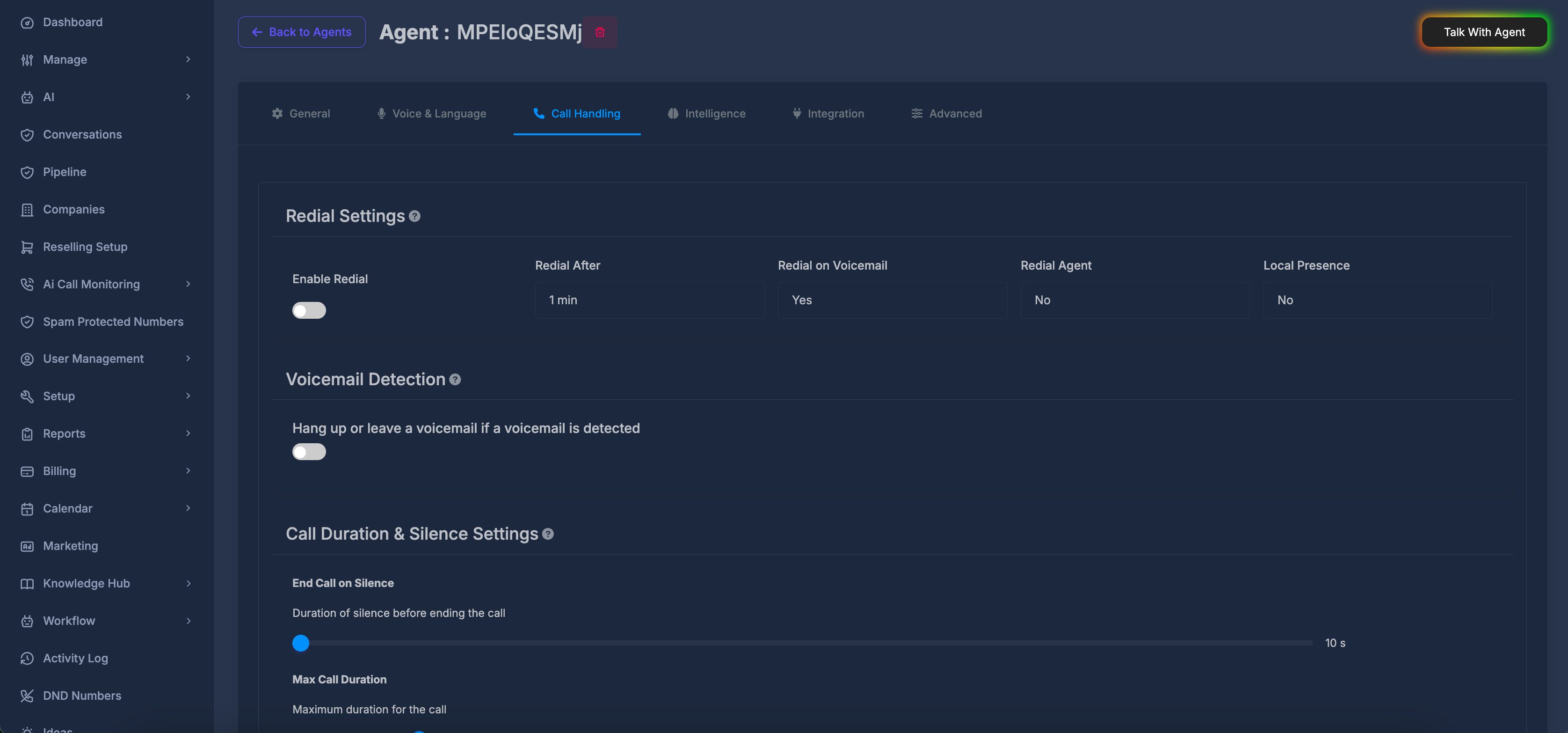
The **Call Handling** tab controls what happens when calls do not connect as hoped, when a **voicemail** is detected, how long calls may run or stay quiet before ending, and whether the agent **remembers callers** across calls. It is grouped into four areas:
1. **🔄 Redial Settings** — automatic follow-up dialing behavior
2. **📧 Voicemail Detection** — what the agent does when it reaches voicemail
3. **⏱️ Call Duration & Silence Settings** — time limits and silence rules
4. **🧠 Caller Memory** — remember callers across calls (optional cost)
Small **information icons** next to section titles show extra hints when you point at them.
 ## 🗂️ Opening the tab
Select **Call Handling** in the row of tabs on the agent settings page.
**🔄 Redial Settings**
This block decides whether the system should **try the number again** after a failed attempt, **how long to wait** between tries, whether **voicemail counts** as a reason to redial, **which agent** should place the redial, and whether **local presence** is used.
## 🗂️ Opening the tab
Select **Call Handling** in the row of tabs on the agent settings page.
**🔄 Redial Settings**
This block decides whether the system should **try the number again** after a failed attempt, **how long to wait** between tries, whether **voicemail counts** as a reason to redial, **which agent** should place the redial, and whether **local presence** is used.
 **🔘 Enable Redial**
**What it does**\
Turns automatic redial **on** or **off**.
* **On** — follow-up attempts may be made according to your other choices in this block.
* **Off** — no automatic redial from these settings.
**How it works**\
When you change the switch, your choice is saved. Changing **Redial After** at the same time also saves together with this setting.
**⏳ Redial After**
**What it does**\
Sets **how long to wait** before placing the next attempt when redial is enabled.
**Choices**
* Instantly
* 1, 2, 3, 4, 5, 10, 15, 20, 25, 30, 45, or 60 minutes
**How it works**\
Each time you change this list, the new wait time is saved (together with the current **Enable Redial** on/off state).
**📥 Redial on Voicemail**
**What it does**\
Sets whether a call that reaches **voicemail** should be treated in a way that allows **redial** behavior according to your rules.
**Choices**
* **Yes**
* **No**
**How it works**\
When you change this, the new choice is saved on its own.
**👤 Redial Agent**
**What it does**\
Lets you choose **another agent** (from your available agents) to handle the **redial** call, or leave redial agent unset.
**Choices**
* **No** — no specific redial agent selected.
* Any **named agent** you pick from the searchable list — that agent is used for the redial when this setting applies.
**How to use it**\
Click the field, type to **search** by name if needed, then pick an agent. Clearing the selection returns to **No**. Changes save when your selection changes.
**🌎 Local Presence**
**What it does**\
Turns **local presence** **on** or **off** for this agent’s calling behavior (for example, whether outbound calls use a local-style caller identity where your service supports it).
**Choices**
* **No**
* **Yes**
**How it works**\
When you change this, the new choice is saved.
**ℹ️ Help text for Redial Settings (information icon)**
Explains that you are configuring **automatic redial** after failed calls, including **how many kinds of conditions** apply, **delays between attempts**, and **when** redialing is allowed.
## 📧 Voicemail Detection
This block sets whether **voicemail detection** is used at all, and if so, whether the agent should **hang up** or **leave a message**.
**🔘 Enable Redial**
**What it does**\
Turns automatic redial **on** or **off**.
* **On** — follow-up attempts may be made according to your other choices in this block.
* **Off** — no automatic redial from these settings.
**How it works**\
When you change the switch, your choice is saved. Changing **Redial After** at the same time also saves together with this setting.
**⏳ Redial After**
**What it does**\
Sets **how long to wait** before placing the next attempt when redial is enabled.
**Choices**
* Instantly
* 1, 2, 3, 4, 5, 10, 15, 20, 25, 30, 45, or 60 minutes
**How it works**\
Each time you change this list, the new wait time is saved (together with the current **Enable Redial** on/off state).
**📥 Redial on Voicemail**
**What it does**\
Sets whether a call that reaches **voicemail** should be treated in a way that allows **redial** behavior according to your rules.
**Choices**
* **Yes**
* **No**
**How it works**\
When you change this, the new choice is saved on its own.
**👤 Redial Agent**
**What it does**\
Lets you choose **another agent** (from your available agents) to handle the **redial** call, or leave redial agent unset.
**Choices**
* **No** — no specific redial agent selected.
* Any **named agent** you pick from the searchable list — that agent is used for the redial when this setting applies.
**How to use it**\
Click the field, type to **search** by name if needed, then pick an agent. Clearing the selection returns to **No**. Changes save when your selection changes.
**🌎 Local Presence**
**What it does**\
Turns **local presence** **on** or **off** for this agent’s calling behavior (for example, whether outbound calls use a local-style caller identity where your service supports it).
**Choices**
* **No**
* **Yes**
**How it works**\
When you change this, the new choice is saved.
**ℹ️ Help text for Redial Settings (information icon)**
Explains that you are configuring **automatic redial** after failed calls, including **how many kinds of conditions** apply, **delays between attempts**, and **when** redialing is allowed.
## 📧 Voicemail Detection
This block sets whether **voicemail detection** is used at all, and if so, whether the agent should **hang up** or **leave a message**.
 **🔀 Main switch — “Hang up or leave a voicemail if a voicemail is detected”**
**What it does**\
Turns voicemail handling **on** or **off**.
* **On** — you can choose **hang up** or **leave a message** below.
* **Off** — the extra choices are hidden; voicemail handling for this agent is turned off.
**How it works**\
When you turn it **on**, the system first enables detection, then applies a **hang up** style rule as the starting point; you can change to **leave a message** afterward.\
When you turn it **off**, voicemail handling is cleared.
**🔀 Main switch — “Hang up or leave a voicemail if a voicemail is detected”**
**What it does**\
Turns voicemail handling **on** or **off**.
* **On** — you can choose **hang up** or **leave a message** below.
* **Off** — the extra choices are hidden; voicemail handling for this agent is turned off.
**How it works**\
When you turn it **on**, the system first enables detection, then applies a **hang up** style rule as the starting point; you can change to **leave a message** afterward.\
When you turn it **off**, voicemail handling is cleared.
 **📴 Hang up if reaching voicemail**
**What it does**\
If voicemail is detected, the call **ends** without leaving a message.
**How it works**\
Selecting this option saves that behavior. The message box for leaving voicemail is not used while this is selected.
**📝 Leave a message if reaching voicemail**
**What it does**\
If voicemail is detected, the agent can **leave a message** instead of hanging up immediately.
**How it works**\
When you select this, the **message area** and **message style** controls appear. You type what should be said (or guided), then save with the **save** button next to the style list.
**🎭 Message style (Static / Prompt)**
**What it does**\
Chooses **how** the voicemail message is formed.
* **Static** — the agent follows the **exact wording** you provide in the box.
* **Prompt** — the agent follows the **instructions or wording** you provide in a more flexible, spoken style (as your platform interprets “prompt” for voicemail).
**How it works**\
Pick **Static** or **Prompt**, enter text in the box, then press the **save** button (disk icon) to store the message. If you change the style and already have text, the product may try to save again when that makes sense.
**🗒️ Message text box**
**What it does**\
Holds the **words or instructions** for the voicemail message.
**When it is active**\
It is only editable when **Leave a message** is selected and voicemail handling is **on**. If you chose **Hang up**, the box is not used.
**ℹ️ Help text for Voicemail Detection (information icon)**
Explains that you can **hang up right away** or **leave a message** when voicemail is detected.
**⏲️ Note on detection timing**
The product may track **how long** to listen for voicemail in the background. Some timing values are prepared for display in older layouts; **only the controls you actually see on the page** need to be set by you. If you do not see a separate “timeout” control, rely on the main switch and the hang-up / message choices above.
## 🧠 Caller Memory
This block controls whether the agent **remembers callers across calls**, so later conversations can continue with prior context instead of starting from scratch every time.
**📴 Hang up if reaching voicemail**
**What it does**\
If voicemail is detected, the call **ends** without leaving a message.
**How it works**\
Selecting this option saves that behavior. The message box for leaving voicemail is not used while this is selected.
**📝 Leave a message if reaching voicemail**
**What it does**\
If voicemail is detected, the agent can **leave a message** instead of hanging up immediately.
**How it works**\
When you select this, the **message area** and **message style** controls appear. You type what should be said (or guided), then save with the **save** button next to the style list.
**🎭 Message style (Static / Prompt)**
**What it does**\
Chooses **how** the voicemail message is formed.
* **Static** — the agent follows the **exact wording** you provide in the box.
* **Prompt** — the agent follows the **instructions or wording** you provide in a more flexible, spoken style (as your platform interprets “prompt” for voicemail).
**How it works**\
Pick **Static** or **Prompt**, enter text in the box, then press the **save** button (disk icon) to store the message. If you change the style and already have text, the product may try to save again when that makes sense.
**🗒️ Message text box**
**What it does**\
Holds the **words or instructions** for the voicemail message.
**When it is active**\
It is only editable when **Leave a message** is selected and voicemail handling is **on**. If you chose **Hang up**, the box is not used.
**ℹ️ Help text for Voicemail Detection (information icon)**
Explains that you can **hang up right away** or **leave a message** when voicemail is detected.
**⏲️ Note on detection timing**
The product may track **how long** to listen for voicemail in the background. Some timing values are prepared for display in older layouts; **only the controls you actually see on the page** need to be set by you. If you do not see a separate “timeout” control, rely on the main switch and the hang-up / message choices above.
## 🧠 Caller Memory
This block controls whether the agent **remembers callers across calls**, so later conversations can continue with prior context instead of starting from scratch every time.
 **🔘 Memory ON / OFF**
**What it does**\
Turns caller memory **on** or **off** for this agent.
* **On** — the agent remembers callers across calls.
* **Off** — each call is treated without shared caller memory from previous conversations.
**Cost note**\
While memory is **ON**, AI call cost increases by approximately **\$0.02 / minute**.
## ⏱️ Call Duration & Silence Settings
This block sets **how long the caller may stay silent** before the call ends, the **maximum length** of a call, and a **short pause** before the agent starts speaking.
**🔘 Memory ON / OFF**
**What it does**\
Turns caller memory **on** or **off** for this agent.
* **On** — the agent remembers callers across calls.
* **Off** — each call is treated without shared caller memory from previous conversations.
**Cost note**\
While memory is **ON**, AI call cost increases by approximately **\$0.02 / minute**.
## ⏱️ Call Duration & Silence Settings
This block sets **how long the caller may stay silent** before the call ends, the **maximum length** of a call, and a **short pause** before the agent starts speaking.
 **🤫 End Call on Silence**
**What it does**\
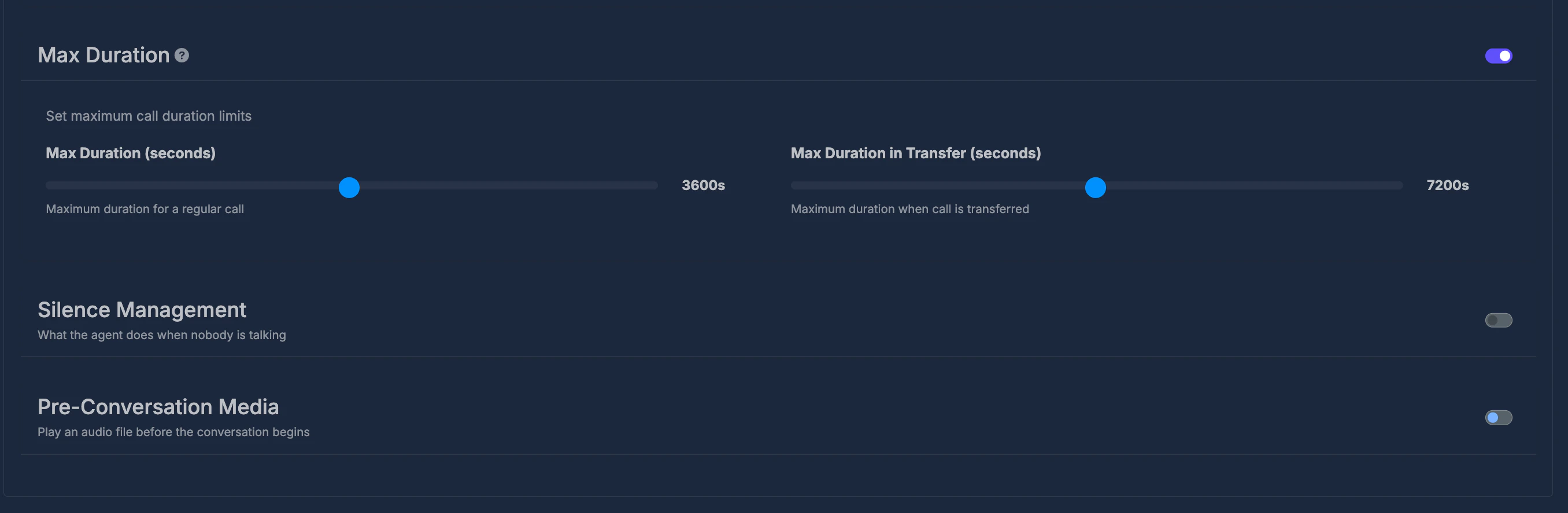
Sets how much **continuous silence** is allowed before the call **ends automatically**.
**Range (on the control)**\
From **10 seconds** up to **30 minutes** (shown as seconds or minutes while you move the control).
**How it works**\
Move the control to choose the length. When you **release** the control after moving it, the new value is saved. A short confirmation message may appear when the save succeeds.
**🤫 End Call on Silence**
**What it does**\
Sets how much **continuous silence** is allowed before the call **ends automatically**.
**Range (on the control)**\
From **10 seconds** up to **30 minutes** (shown as seconds or minutes while you move the control).
**How it works**\
Move the control to choose the length. When you **release** the control after moving it, the new value is saved. A short confirmation message may appear when the save succeeds.
 **⏲️ Max Call Duration**
**What it does**\
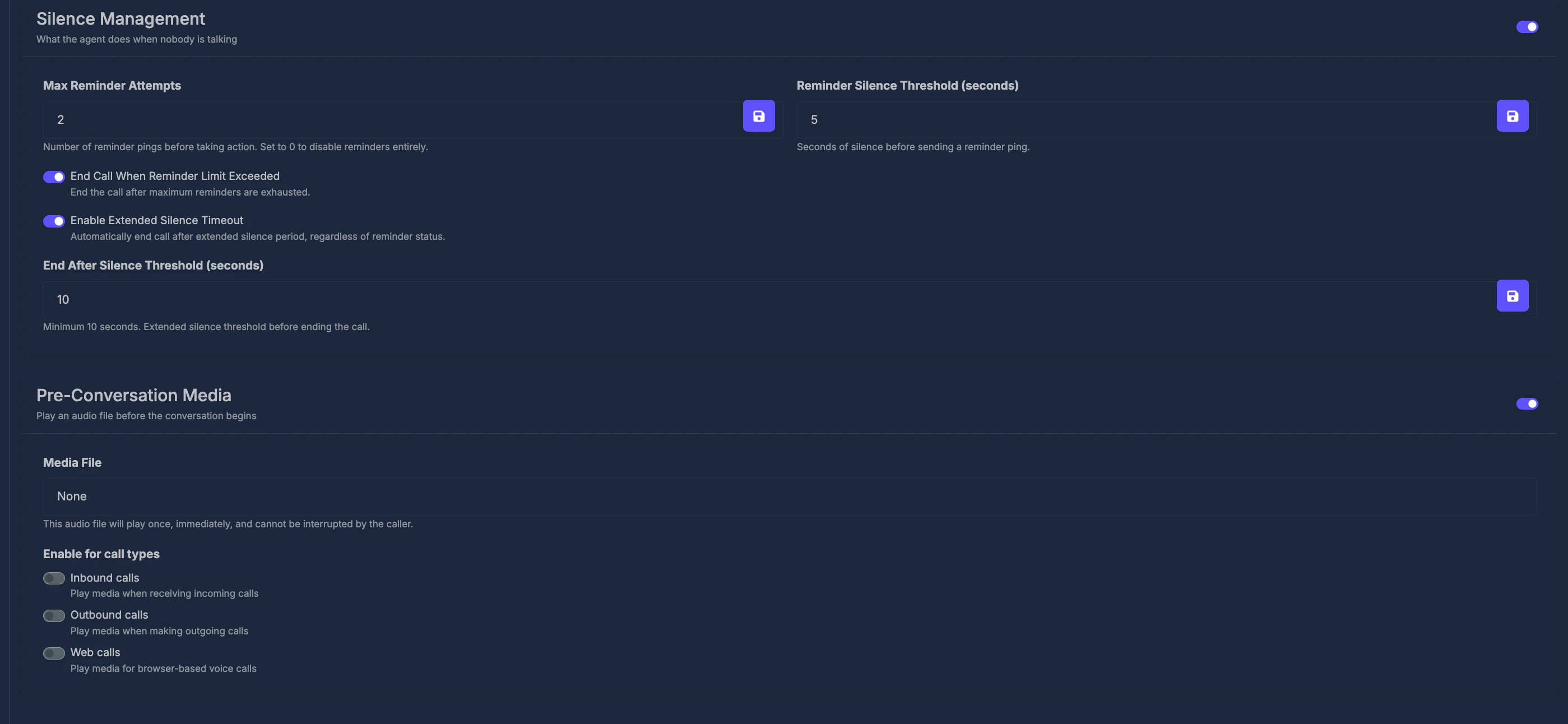
Sets the **longest** a single call may last before it **ends automatically**.
**Range (on the control)**\
From **1 minute** up to **2 hours** (the screen may show minutes or hours for longer times).
**Rules**\
The product expects at least **one minute**. The control’s minimum is set so you normally cannot go below that.
**How it works**\
Move the control; the label updates to show minutes or hours. The value is saved after you finish adjusting (including when you release the mouse after dragging).
**⏸️ Pause Before Speaking**
**What it does**\
Sets how long the agent **waits** after the call connects before **starting to speak**.
**Range (on the control)**\
From **0 seconds** up to **5 seconds**.
**How it works**\
Move the control; the label shows seconds. The value saves after you finish adjusting (including when you release the mouse after dragging).
**⏲️ Max Call Duration**
**What it does**\
Sets the **longest** a single call may last before it **ends automatically**.
**Range (on the control)**\
From **1 minute** up to **2 hours** (the screen may show minutes or hours for longer times).
**Rules**\
The product expects at least **one minute**. The control’s minimum is set so you normally cannot go below that.
**How it works**\
Move the control; the label updates to show minutes or hours. The value is saved after you finish adjusting (including when you release the mouse after dragging).
**⏸️ Pause Before Speaking**
**What it does**\
Sets how long the agent **waits** after the call connects before **starting to speak**.
**Range (on the control)**\
From **0 seconds** up to **5 seconds**.
**How it works**\
Move the control; the label shows seconds. The value saves after you finish adjusting (including when you release the mouse after dragging).