> ## Documentation Index
> Fetch the complete documentation index at: https://docs.aisync.link/llms.txt
> Use this file to discover all available pages before exploring further.
# Dialing Compliance
> This tab protects you from breaking telemarketing laws. Everything here controls **when**, **where**, and **under what rules** your AI agent is allowed to make calls.
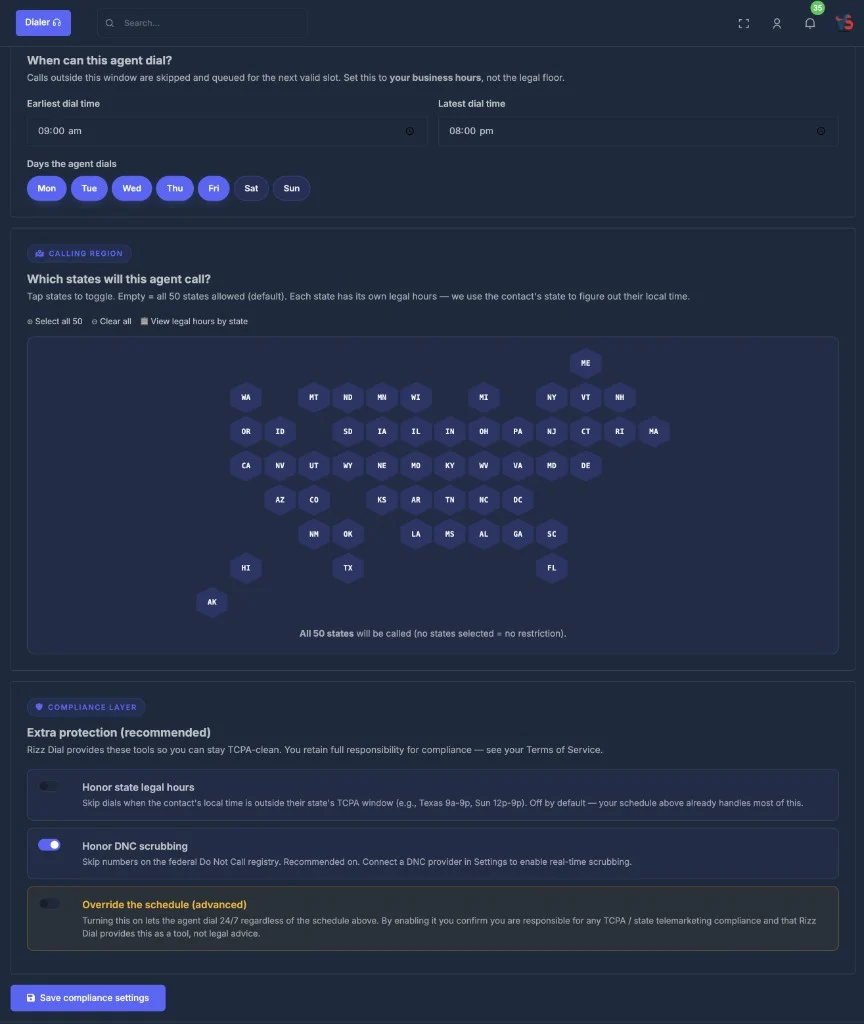 Define the specific times this agent is permitted to make calls.
Select the US states this agent is allowed to contact.
Choose which compliance safeguards should be enforced automatically.
## 🕐 Section 1 — Schedule
Define the specific times this agent is permitted to make calls.
Select the US states this agent is allowed to contact.
Choose which compliance safeguards should be enforced automatically.
## 🕐 Section 1 — Schedule
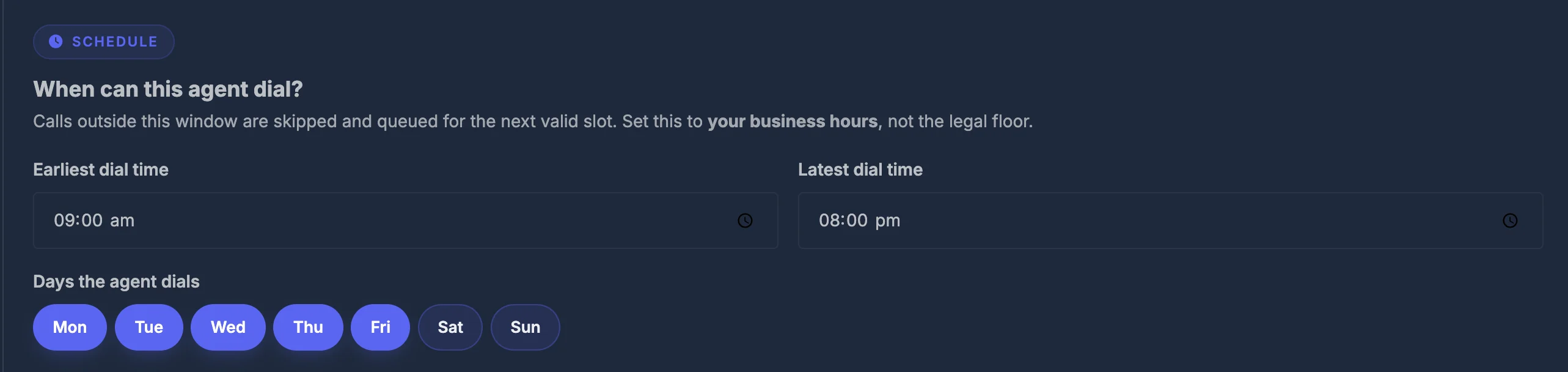 **Question it answers:** *When is this agent allowed to dial?*
### ⏰ Earliest & latest dial time
Set a **start time** and **end time** for the calling window.
* Any call scheduled outside this window is **automatically held** and queued until the next allowed time slot — it does not get skipped or lost, just delayed.
* Example: Set `09:00` to `17:00` and the agent will only call between 9 AM and 5 PM.
### 📅 Calling days
Seven day-chips appear: **Mon, Tue, Wed, Thu, Fri, Sat, Sun**
* Click a chip to **turn that day on** (highlighted = active).
* Click again to **turn it off**.
* The agent will only dial on days that are active.
| Common setup | Days to activate |
| --------------------------- | ---------------- |
| Standard business week | Mon → Fri |
| Including Saturday outreach | Mon → Sat |
| 7-day campaign | All 7 days |
## 🗺️ Section 2 — Calling region
**Question it answers:** *When is this agent allowed to dial?*
### ⏰ Earliest & latest dial time
Set a **start time** and **end time** for the calling window.
* Any call scheduled outside this window is **automatically held** and queued until the next allowed time slot — it does not get skipped or lost, just delayed.
* Example: Set `09:00` to `17:00` and the agent will only call between 9 AM and 5 PM.
### 📅 Calling days
Seven day-chips appear: **Mon, Tue, Wed, Thu, Fri, Sat, Sun**
* Click a chip to **turn that day on** (highlighted = active).
* Click again to **turn it off**.
* The agent will only dial on days that are active.
| Common setup | Days to activate |
| --------------------------- | ---------------- |
| Standard business week | Mon → Fri |
| Including Saturday outreach | Mon → Sat |
| 7-day campaign | All 7 days |
## 🗺️ Section 2 — Calling region
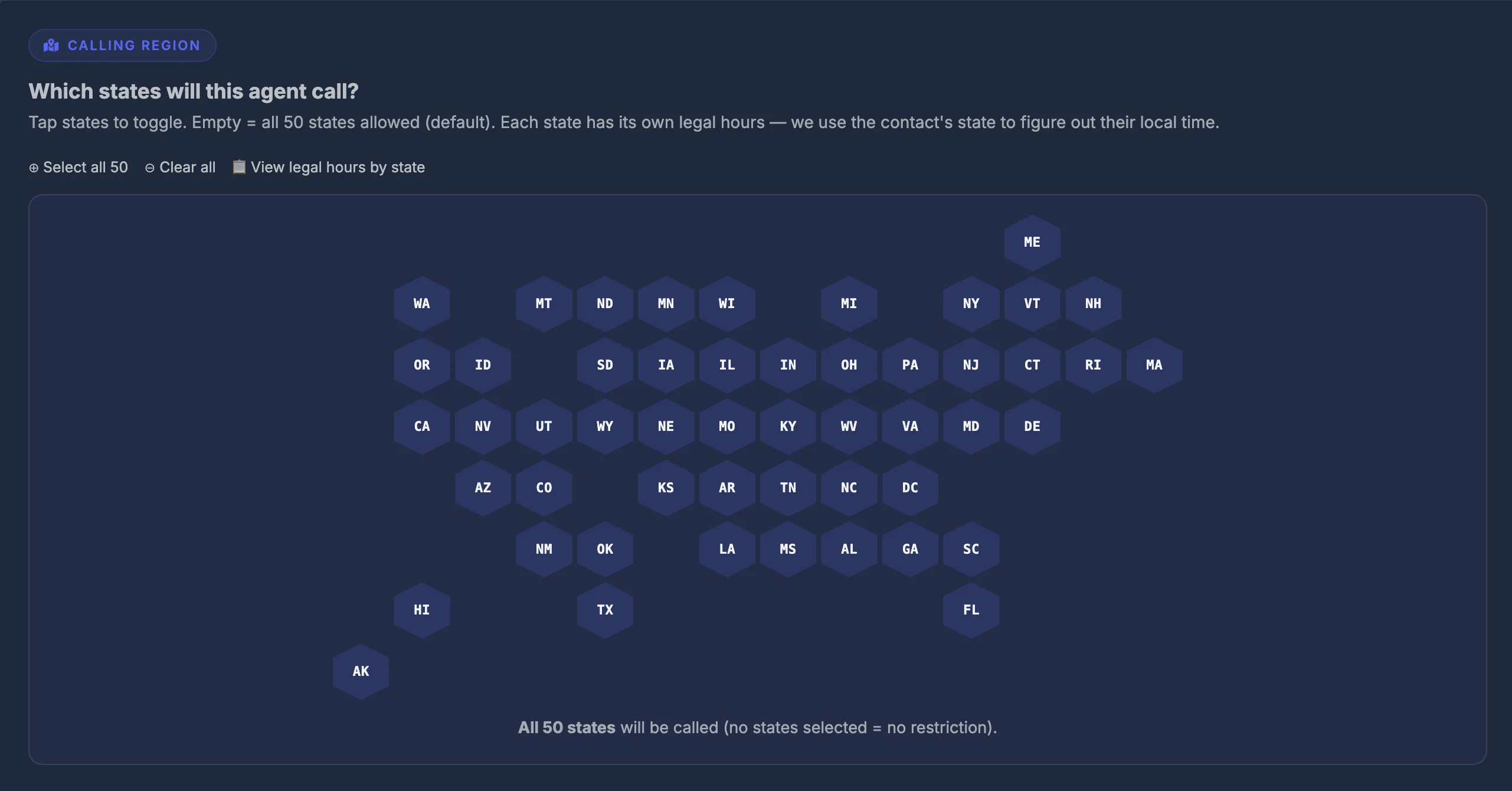 **Question it answers:** *Which US states is this agent allowed to call into?*
### 🌎 The interactive state map
A **hex-grid map of the United States** lets you visually select states one by one. Each state is a clickable hexagon.
* **Click a state** → it highlights (selected / allowed).
* **Click again** → it deactivates (blocked).
#### 🔗 Quick-action links above the map
| Link | What it does |
| -------------------------------- | ----------------------------------- |
| **⊕ Select all 50** | Activates every state at once |
| **⊖ Clear all** | Removes all state selections |
| **📋 View legal hours by state** | Opens a reference table (see below) |
#### ✅ No states selected = all states allowed
If you leave the map completely empty (no states highlighted), the agent treats that as **no restriction** — it can call all 50 states. Select specific states only if you want to **restrict** calling to certain regions.
### 📋 Legal hours reference table
Click **"View legal hours by state"** to open a popup table showing every state's legal calling window, for example:
| State | Weekdays | Sunday | Notes |
| ---------- | --------- | ---------- | --------------------- |
| Texas | 9am – 9pm | 12pm – 9pm | Sundays restricted |
| California | 8am – 9pm | 8am – 9pm | Federal floor |
| Florida | 8am – 8pm | 8am – 8pm | Stricter than federal |
This is a **reference only**. To actually enforce these state-specific rules automatically, you need to turn on the **Honor State Legal Hours** toggle in Section 3 below.
## 🛡️ Section 3 — Compliance layer
**Question it answers:** *Which US states is this agent allowed to call into?*
### 🌎 The interactive state map
A **hex-grid map of the United States** lets you visually select states one by one. Each state is a clickable hexagon.
* **Click a state** → it highlights (selected / allowed).
* **Click again** → it deactivates (blocked).
#### 🔗 Quick-action links above the map
| Link | What it does |
| -------------------------------- | ----------------------------------- |
| **⊕ Select all 50** | Activates every state at once |
| **⊖ Clear all** | Removes all state selections |
| **📋 View legal hours by state** | Opens a reference table (see below) |
#### ✅ No states selected = all states allowed
If you leave the map completely empty (no states highlighted), the agent treats that as **no restriction** — it can call all 50 states. Select specific states only if you want to **restrict** calling to certain regions.
### 📋 Legal hours reference table
Click **"View legal hours by state"** to open a popup table showing every state's legal calling window, for example:
| State | Weekdays | Sunday | Notes |
| ---------- | --------- | ---------- | --------------------- |
| Texas | 9am – 9pm | 12pm – 9pm | Sundays restricted |
| California | 8am – 9pm | 8am – 9pm | Federal floor |
| Florida | 8am – 8pm | 8am – 8pm | Stricter than federal |
This is a **reference only**. To actually enforce these state-specific rules automatically, you need to turn on the **Honor State Legal Hours** toggle in Section 3 below.
## 🛡️ Section 3 — Compliance layer
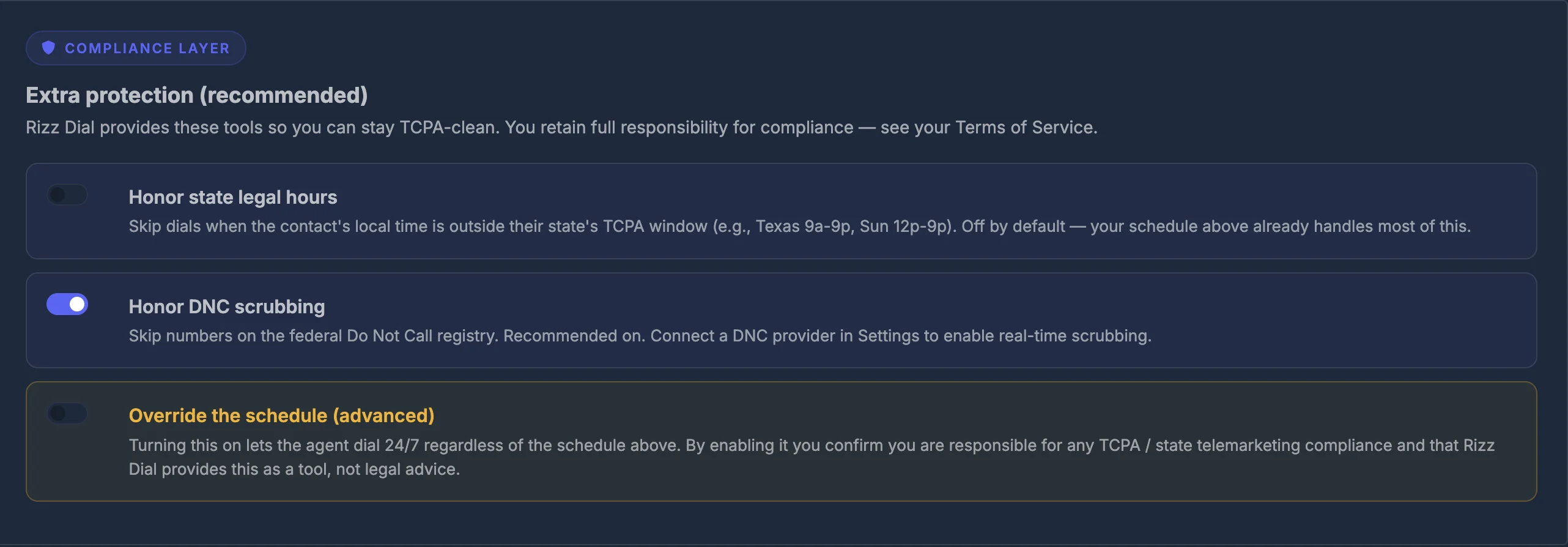 **Question it answers:** *What extra automatic protections should be active?*
Three toggles, each controlling a different layer of protection.
### ⚖️ Toggle 1 — Honor state legal hours
| | OFF (default) | ON |
| ---------------- | -------------------------------------- | --------------------------------------------------------------------------------- |
| **What happens** | Only your schedule (Section 1) is used | The system also checks the **contact's local time** in their state before dialing |
**Example of why this matters:**
Your schedule says 8 AM – 9 PM. A contact lives in Florida where calls must stop at 8 PM. Without this toggle, the agent might call that Florida contact at 8:30 PM your time. With this toggle ON, the system sees it is 8:30 PM in Florida and **holds the call** until the next allowed window.
**Turn this ON if:**
* You are calling contacts across multiple US states
* Your contact list spans different time zones
* You want automatic per-state legal protection without managing it manually
### 🚫 Toggle 2 — Honor DNC scrubbing
**DNC = Do Not Call registry** — a federal list of phone numbers that have opted out of receiving telemarketing calls.
| | OFF | ON |
| ---------------- | --------------------------------- | ----------------------------------------------------- |
| **What happens** | All numbers are dialed regardless | Numbers on the DNC registry are automatically skipped |
To use real-time DNC scrubbing, you need a DNC provider connected in your **account settings**. Once connected, every number is checked against the registry before the call is placed.
### ⚠️ Toggle 3 — Override the schedule
This is a **high-risk setting** — read carefully before enabling.
When this is turned **ON**:
* The agent ignores **all time restrictions** you set in Section 1
* The agent ignores **all state legal hours** from Section 2
* The agent can dial **24 hours a day, 7 days a week**
* A bright warning banner appears on screen confirming the override is active
**By enabling this toggle, you confirm:**
* You personally accept full legal responsibility for any compliance issues
* You have the legal authorization to call outside standard hours
* The platform is providing this as a tool, not endorsing the practice
**Only use this for:**
* Emergency or time-sensitive services with prior express consent
* Situations where you have confirmed written authorization from contacts
* Internal testing environments (never production calling lists)
**📢 The override warning banner**
When Override is active, a blue information banner appears below the compliance settings:
> **Override active.** The schedule and state legal hours are bypassed for this agent. Logged on the agent record.
This banner is a reminder — it does not go away until you turn the override off.
## 💾 Saving your settings
Click the **Save compliance settings** button at the bottom.
* A success message confirms the save: `✓ Saved`
* Changes take effect on the **next call** placed by the agent
**Question it answers:** *What extra automatic protections should be active?*
Three toggles, each controlling a different layer of protection.
### ⚖️ Toggle 1 — Honor state legal hours
| | OFF (default) | ON |
| ---------------- | -------------------------------------- | --------------------------------------------------------------------------------- |
| **What happens** | Only your schedule (Section 1) is used | The system also checks the **contact's local time** in their state before dialing |
**Example of why this matters:**
Your schedule says 8 AM – 9 PM. A contact lives in Florida where calls must stop at 8 PM. Without this toggle, the agent might call that Florida contact at 8:30 PM your time. With this toggle ON, the system sees it is 8:30 PM in Florida and **holds the call** until the next allowed window.
**Turn this ON if:**
* You are calling contacts across multiple US states
* Your contact list spans different time zones
* You want automatic per-state legal protection without managing it manually
### 🚫 Toggle 2 — Honor DNC scrubbing
**DNC = Do Not Call registry** — a federal list of phone numbers that have opted out of receiving telemarketing calls.
| | OFF | ON |
| ---------------- | --------------------------------- | ----------------------------------------------------- |
| **What happens** | All numbers are dialed regardless | Numbers on the DNC registry are automatically skipped |
To use real-time DNC scrubbing, you need a DNC provider connected in your **account settings**. Once connected, every number is checked against the registry before the call is placed.
### ⚠️ Toggle 3 — Override the schedule
This is a **high-risk setting** — read carefully before enabling.
When this is turned **ON**:
* The agent ignores **all time restrictions** you set in Section 1
* The agent ignores **all state legal hours** from Section 2
* The agent can dial **24 hours a day, 7 days a week**
* A bright warning banner appears on screen confirming the override is active
**By enabling this toggle, you confirm:**
* You personally accept full legal responsibility for any compliance issues
* You have the legal authorization to call outside standard hours
* The platform is providing this as a tool, not endorsing the practice
**Only use this for:**
* Emergency or time-sensitive services with prior express consent
* Situations where you have confirmed written authorization from contacts
* Internal testing environments (never production calling lists)
**📢 The override warning banner**
When Override is active, a blue information banner appears below the compliance settings:
> **Override active.** The schedule and state legal hours are bypassed for this agent. Logged on the agent record.
This banner is a reminder — it does not go away until you turn the override off.
## 💾 Saving your settings
Click the **Save compliance settings** button at the bottom.
* A success message confirms the save: `✓ Saved`
* Changes take effect on the **next call** placed by the agent