> ## Documentation Index
> Fetch the complete documentation index at: https://docs.aisync.link/llms.txt
> Use this file to discover all available pages before exploring further.
# Phone Numbers
### 📖 Overview
Use **AI Phone Numbers** to manage phone numbers that work with your AI assistants. You can see all AI numbers for your organization, give them names, choose which assistant answers incoming calls and which one places outgoing calls, connect existing **Rizz** numbers to AI, buy new numbers on another page, and optionally enroll numbers in **spam protection** so carriers are less likely to treat them as unwanted calls.
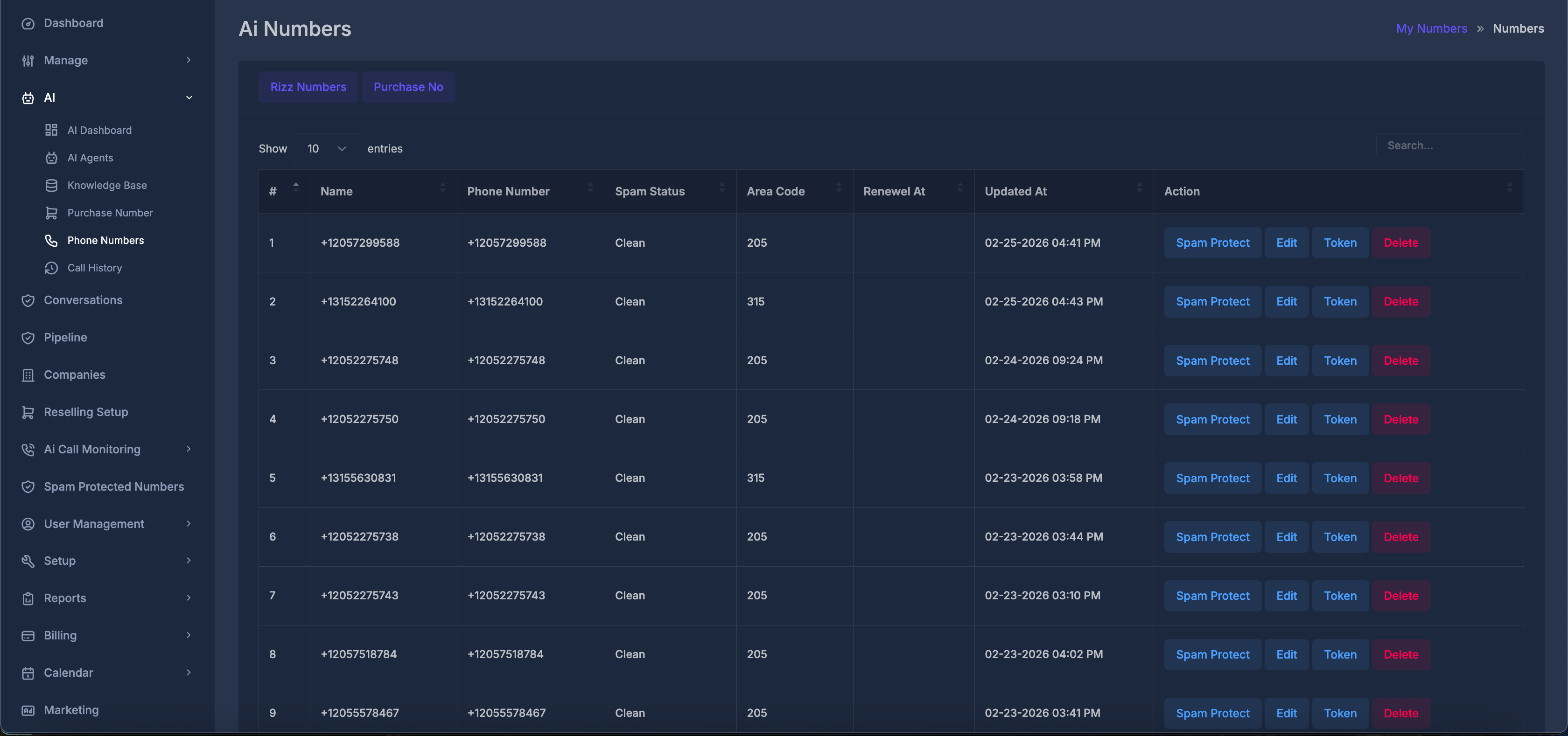 ## 🔘 Buttons at the top of the page
| What you see | What it does |
| ---------------- | --------------------------------------------------------------------------------------------------------------------------------------------- |
| **Rizz Numbers** | Opens a window to connect an existing **Rizz** phone number (from your account) to inbound and/or outbound AI assistants. |
| **Purchase No** | Takes you to another page where you can search for and buy a new number (from available providers) and attach AI assistants at purchase time. |
## 🔘 Buttons at the top of the page
| What you see | What it does |
| ---------------- | --------------------------------------------------------------------------------------------------------------------------------------------- |
| **Rizz Numbers** | Opens a window to connect an existing **Rizz** phone number (from your account) to inbound and/or outbound AI assistants. |
| **Purchase No** | Takes you to another page where you can search for and buy a new number (from available providers) and attach AI assistants at purchase time. |
 ## 🗂️ The main table — columns
Each row is one AI phone number. Columns are:
| Column | Meaning |
| ---------------- | ----------------------------------------------------------------------------------------------------------------------------------------------------------------------------------------- |
| **#** | Row number (1, 2, 3, …). |
| **Name** | The **nickname** you gave this number so you can recognize it in lists. |
| **Phone Number** | The full phone number. |
| **Spam Status** | The current spam-reputation status tracked for this number (for example whether it is clean, in progress of checking, or flagged). |
| **Code** | The three-digit code associated with this number. |
| **Renewel At** | If this number is **billable** for your account, this shows when the next renewal date/time is, in **your** time zone. If the number is not billable in that way, this cell may be empty. |
| **Updated At** | When this record was last changed, in **your** time zone. |
| **Action** | Buttons for **Spam Protect** (when allowed), **Edit**, and **Delete**. A **Token** control exists in the page for advanced inbound contact mapping but is normally hidden. |
## 🗂️ The main table — columns
Each row is one AI phone number. Columns are:
| Column | Meaning |
| ---------------- | ----------------------------------------------------------------------------------------------------------------------------------------------------------------------------------------- |
| **#** | Row number (1, 2, 3, …). |
| **Name** | The **nickname** you gave this number so you can recognize it in lists. |
| **Phone Number** | The full phone number. |
| **Spam Status** | The current spam-reputation status tracked for this number (for example whether it is clean, in progress of checking, or flagged). |
| **Code** | The three-digit code associated with this number. |
| **Renewel At** | If this number is **billable** for your account, this shows when the next renewal date/time is, in **your** time zone. If the number is not billable in that way, this cell may be empty. |
| **Updated At** | When this record was last changed, in **your** time zone. |
| **Action** | Buttons for **Spam Protect** (when allowed), **Edit**, and **Delete**. A **Token** control exists in the page for advanced inbound contact mapping but is normally hidden. |
 ## ⚙️ Actions on a row
**🛡️ Spam Protected**
* Appears only when this AI number is **not** already in the spam protection program.
* After you confirm, the system checks your company’s messaging profile setup. If something is missing, you may be asked to contact support.
* If the number is already listed under spam protection, you will see a message instead of adding it twice.
* On success, the **Spam Protect** button is hidden for that row.
**🗑️ Delete**
Asks for confirmation, then removes the AI number. Use only when you are sure you no longer need it.
### 🏷️ Token
If available, this opens **Inbound User Information**, where you link your contact fields to fields in **GoHighLevel (GHL)** and pick a **GHL Location**. You must map **at least one** field before saving. This helps inbound call information line up with your CRM fields. Changing the location can load that location’s custom fields for mapping.
## ⚙️ Actions on a row
**🛡️ Spam Protected**
* Appears only when this AI number is **not** already in the spam protection program.
* After you confirm, the system checks your company’s messaging profile setup. If something is missing, you may be asked to contact support.
* If the number is already listed under spam protection, you will see a message instead of adding it twice.
* On success, the **Spam Protect** button is hidden for that row.
**🗑️ Delete**
Asks for confirmation, then removes the AI number. Use only when you are sure you no longer need it.
### 🏷️ Token
If available, this opens **Inbound User Information**, where you link your contact fields to fields in **GoHighLevel (GHL)** and pick a **GHL Location**. You must map **at least one** field before saving. This helps inbound call information line up with your CRM fields. Changing the location can load that location’s custom fields for mapping.
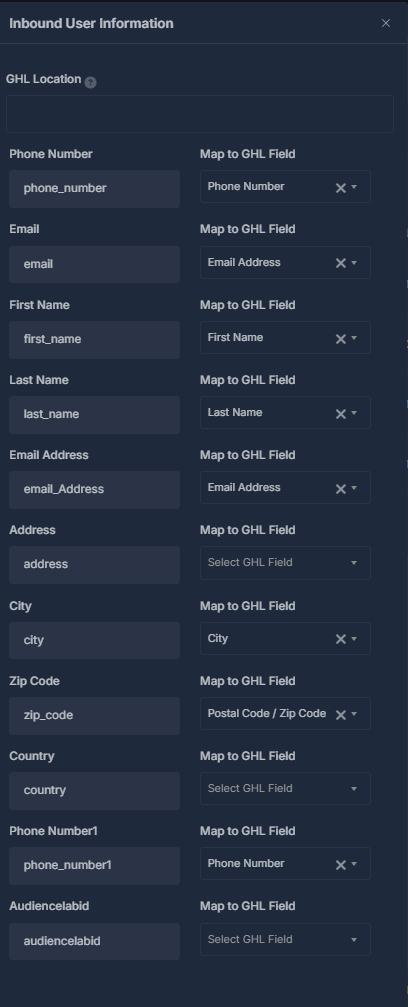 **Tokens** are field mappings (not login credentials): they tell the AI which GHL contact fields to use on **incoming** calls. Only mapped fields are available to the AI.
Example mappings you might see or configure include **GHL Location**, **Phone Number** (`phone_number` / `phone_number1`), **Email** / **Email Address**, **First Name**, **Last Name**, address fields (**address**, **city**, **zip\_code**, **country**), and custom fields such as **AudienceLabelId** (`audiencelabelid`), aligned with your GHL setup.
### ⚙️ Phone Number Settings
This window is used in two situations:
**Tokens** are field mappings (not login credentials): they tell the AI which GHL contact fields to use on **incoming** calls. Only mapped fields are available to the AI.
Example mappings you might see or configure include **GHL Location**, **Phone Number** (`phone_number` / `phone_number1`), **Email** / **Email Address**, **First Name**, **Last Name**, address fields (**address**, **city**, **zip\_code**, **country**), and custom fields such as **AudienceLabelId** (`audiencelabelid`), aligned with your GHL setup.
### ⚙️ Phone Number Settings
This window is used in two situations:
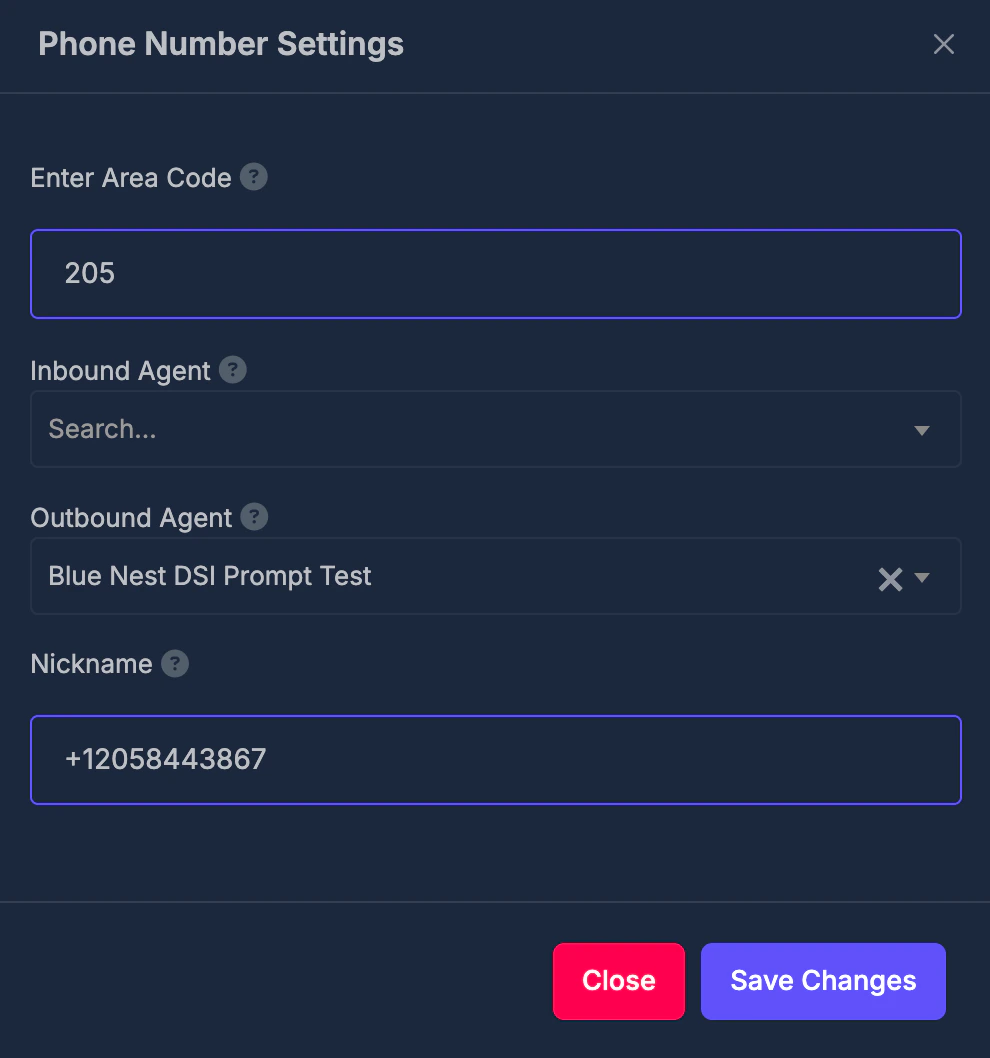 1. **Adding a new AI number** (when opened without editing an existing row — for example from flows that open this modal with empty or default values).
2. **Editing** an existing number (via **Edit** on a row).
**Fields:**
| Field | Purpose |
| ------------------ | ---------------------------------------------------------------------------------------------------------------------------------------------------------------------------------------------------------- |
| **Enter Code** | The three-digit code for the region where you want the new number, or the code tied to this number when editing. Help text: *Enter the 3-digit code for the location where you want to purchase a number.* |
| **Inbound Agent** | The AI assistant that answers **incoming** calls to this number. Help text: *Select the AI agent that will handle incoming calls to this number.* |
| **Outbound Agent** | The AI assistant used for **outgoing** calls from this number. Help text: *Select the AI agent that will handle outgoing calls from this number.* |
| **Nickname** | A short label so you can find this number easily. Help text: *Give this number a descriptive name for easy identification.* |
**💾 Save Changes:**
* **Code** and **nickname** are required before the system will proceed.
* If you are **creating** a new number, the system requests a new number for that code, applies your assistant choices and nickname, and records a **usage charge** for obtaining that phone number where your plan requires it.
* If you are **updating** an existing number, the system updates the phone connection and nickname, and adjusts assignments so that **another number in your account cannot use the same inbound assistant or the same outbound assistant** at the same time—those other numbers are cleared for that assistant type when needed.
On success, the page refreshes so you see the latest list.
## 🔗 Connect Rizz Number
This connects an existing **Rizz** number from your account (one that is already set up for voice routing and is not reserved only for the dialer) to AI assistants.
1. **Adding a new AI number** (when opened without editing an existing row — for example from flows that open this modal with empty or default values).
2. **Editing** an existing number (via **Edit** on a row).
**Fields:**
| Field | Purpose |
| ------------------ | ---------------------------------------------------------------------------------------------------------------------------------------------------------------------------------------------------------- |
| **Enter Code** | The three-digit code for the region where you want the new number, or the code tied to this number when editing. Help text: *Enter the 3-digit code for the location where you want to purchase a number.* |
| **Inbound Agent** | The AI assistant that answers **incoming** calls to this number. Help text: *Select the AI agent that will handle incoming calls to this number.* |
| **Outbound Agent** | The AI assistant used for **outgoing** calls from this number. Help text: *Select the AI agent that will handle outgoing calls from this number.* |
| **Nickname** | A short label so you can find this number easily. Help text: *Give this number a descriptive name for easy identification.* |
**💾 Save Changes:**
* **Code** and **nickname** are required before the system will proceed.
* If you are **creating** a new number, the system requests a new number for that code, applies your assistant choices and nickname, and records a **usage charge** for obtaining that phone number where your plan requires it.
* If you are **updating** an existing number, the system updates the phone connection and nickname, and adjusts assignments so that **another number in your account cannot use the same inbound assistant or the same outbound assistant** at the same time—those other numbers are cleared for that assistant type when needed.
On success, the page refreshes so you see the latest list.
## 🔗 Connect Rizz Number
This connects an existing **Rizz** number from your account (one that is already set up for voice routing and is not reserved only for the dialer) to AI assistants.
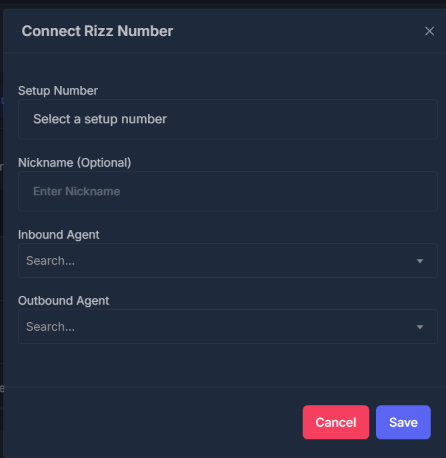 **Fields:**
| Field | Purpose |
| ----------------------- | ---------------------------------------------------------------------------------------------------------------------------------------------- |
| **Setup Number** | Choose which existing Rizz number to connect. Help text: *Select an existing Rizz number from your account to setup with AI agents.* |
| **Nickname (Optional)** | A label for this connection. Help text: *Give this Rizz number a descriptive name for easy identification.* |
| **Inbound Agent** | Which AI assistant answers calls to this Rizz number. Help text: *Select the AI agent that will handle incoming calls to this Rizz number.* |
| **Outbound Agent** | Which AI assistant places calls from this Rizz number. Help text: *Select the AI agent that will handle outgoing calls from this Rizz number.* |
You must pick a **Setup Number**. Saving applies the same kind of rule as above: only one number at a time can hold a given inbound assistant, and only one can hold a given outbound assistant; other numbers may be unassigned from that assistant automatically.
## 🛒 Purchase No
On the purchase page you typically:
* Choose a **nickname** (required).
* Choose **inbound** and **outbound** AI assistants.
* Search for and select an available phone number.
* Choose a **provider** (for example Twilio or Plivo).
**Fields:**
| Field | Purpose |
| ----------------------- | ---------------------------------------------------------------------------------------------------------------------------------------------- |
| **Setup Number** | Choose which existing Rizz number to connect. Help text: *Select an existing Rizz number from your account to setup with AI agents.* |
| **Nickname (Optional)** | A label for this connection. Help text: *Give this Rizz number a descriptive name for easy identification.* |
| **Inbound Agent** | Which AI assistant answers calls to this Rizz number. Help text: *Select the AI agent that will handle incoming calls to this Rizz number.* |
| **Outbound Agent** | Which AI assistant places calls from this Rizz number. Help text: *Select the AI agent that will handle outgoing calls from this Rizz number.* |
You must pick a **Setup Number**. Saving applies the same kind of rule as above: only one number at a time can hold a given inbound assistant, and only one can hold a given outbound assistant; other numbers may be unassigned from that assistant automatically.
## 🛒 Purchase No
On the purchase page you typically:
* Choose a **nickname** (required).
* Choose **inbound** and **outbound** AI assistants.
* Search for and select an available phone number.
* Choose a **provider** (for example Twilio or Plivo).
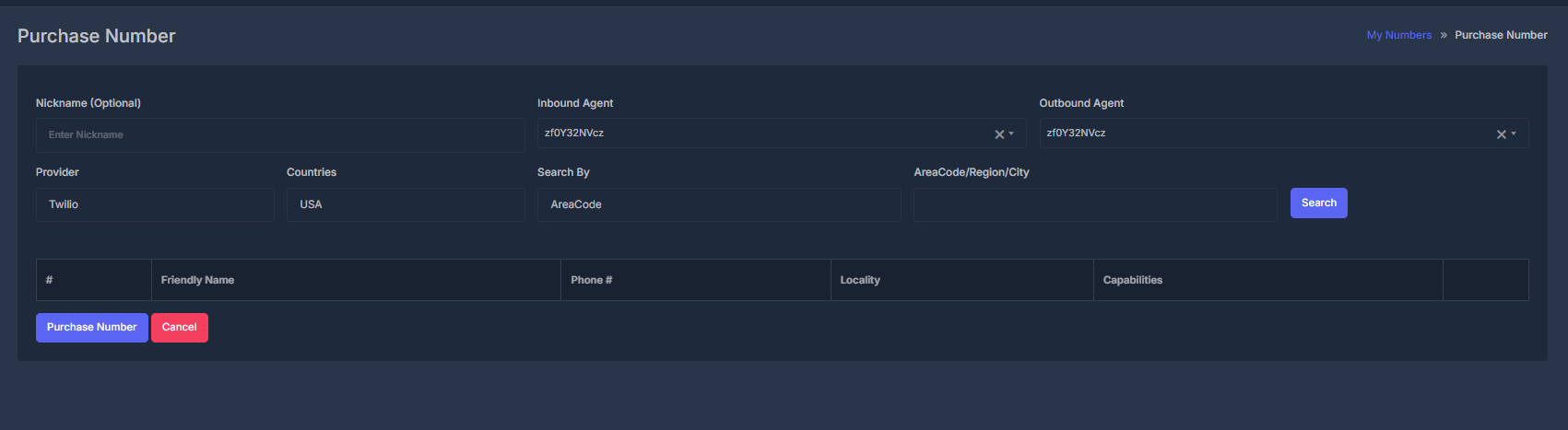 When you complete a purchase successfully, the new number is bought and wired up with the same assistant and nickname behavior as in the main AI Numbers list.