> ## Documentation Index
> Fetch the complete documentation index at: https://docs.aisync.link/llms.txt
> Use this file to discover all available pages before exploring further.
# SMS Templates
> User guide for creating, editing, searching, and managing reusable SMS templates.
**SMS Templates** lets you save reusable text messages that you can use later (for example in campaigns or other SMS flows).
Each template has:
* A **Title** (short name so people can find it quickly).
* A **Template** body (the message text itself).
Templates belong to the current workspace, so users who can access this screen usually see the same template list for that workspace.
 ## 📄 The template list
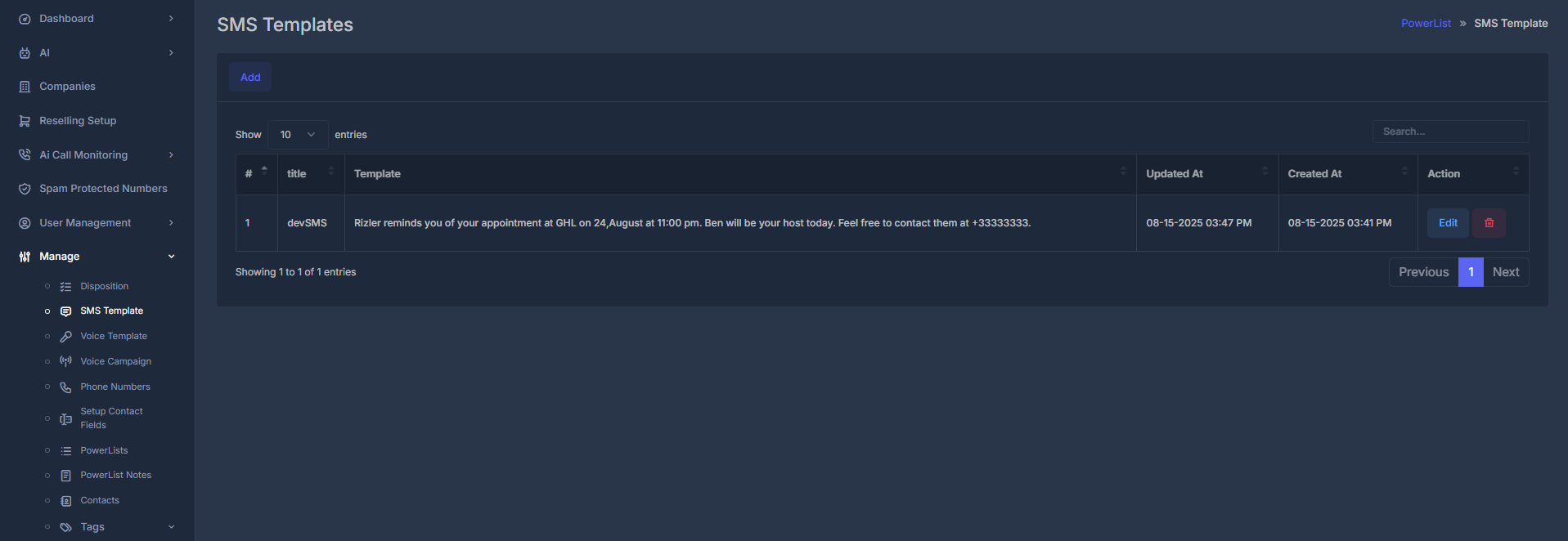
The table shows one row per template.
| Column | What it shows |
| -------------- | ------------------------------------------ |
| **#** | Row number (1, 2, 3, ...). |
| **Title** | The name you gave the template. |
| **Template** | The full message text. |
| **Updated At** | Last update time (shown in your timezone). |
| **Created At** | Creation time (shown in your timezone). |
| **Action** | Controls to edit or delete the row. |
At the top of the table:
* **Search** filters templates by title or message content.
* Results are shown in **pages** (commonly 10 per page).
* Use bottom paging controls to move through long lists.
## ➕ Add a new template
1. Click **Add**.
2. The list view hides and the form opens.
3. Fill in **Title** and **SMS Template**.
4. Click **Submit**.
## 📄 The template list
The table shows one row per template.
| Column | What it shows |
| -------------- | ------------------------------------------ |
| **#** | Row number (1, 2, 3, ...). |
| **Title** | The name you gave the template. |
| **Template** | The full message text. |
| **Updated At** | Last update time (shown in your timezone). |
| **Created At** | Creation time (shown in your timezone). |
| **Action** | Controls to edit or delete the row. |
At the top of the table:
* **Search** filters templates by title or message content.
* Results are shown in **pages** (commonly 10 per page).
* Use bottom paging controls to move through long lists.
## ➕ Add a new template
1. Click **Add**.
2. The list view hides and the form opens.
3. Fill in **Title** and **SMS Template**.
4. Click **Submit**.
 What to expect while saving:
* If required fields are empty, the form prompts you to complete them.
* While saving, a short “please wait” style message may appear.
* On success, you get confirmation and return to the list shortly after.
## ✏️ Edit a template
1. In the list, click **Edit** on a row.
2. The form opens with **Edit SMS Template**.
3. Existing values load into **Title** and **SMS Template**.
4. Make your changes and click **Submit**.
What to expect while saving:
* If required fields are empty, the form prompts you to complete them.
* While saving, a short “please wait” style message may appear.
* On success, you get confirmation and return to the list shortly after.
## ✏️ Edit a template
1. In the list, click **Edit** on a row.
2. The form opens with **Edit SMS Template**.
3. Existing values load into **Title** and **SMS Template**.
4. Make your changes and click **Submit**.
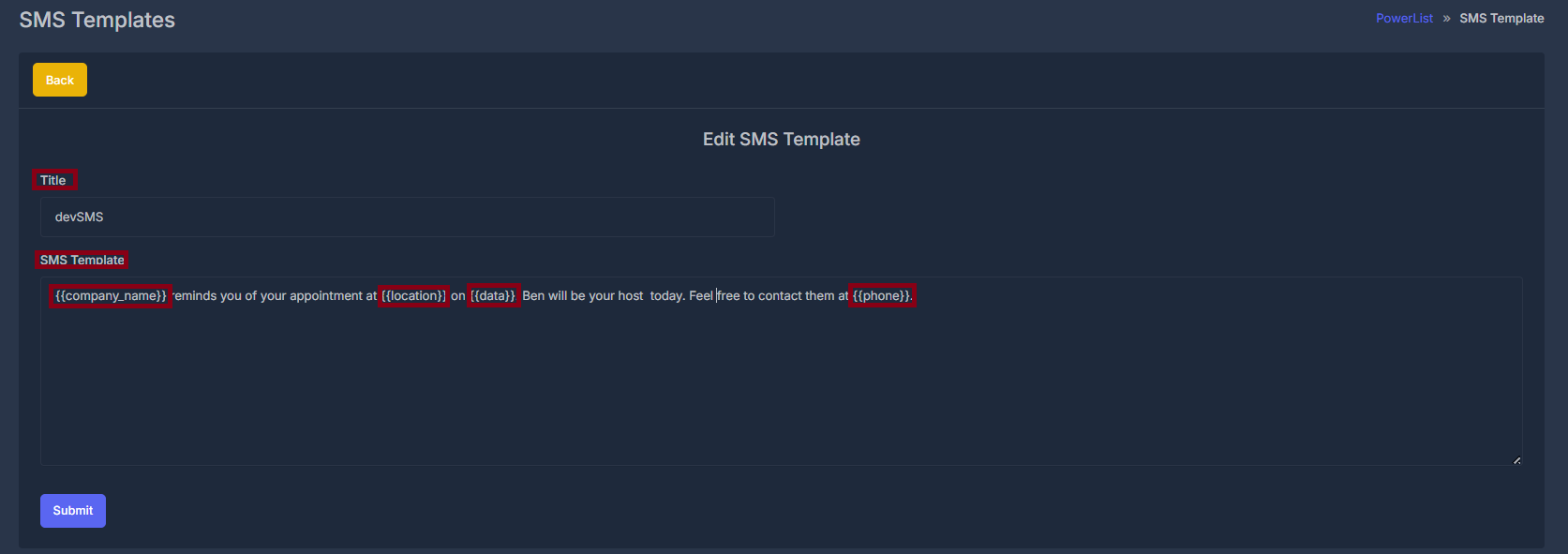 Saving behavior is the same as Add: validation -> wait message -> success -> back to list.
## 🗑️ Delete a template
Click the **Delete** or trash action on a row and confirm when asked.
* If confirmed, the template is removed.
* You stay on the list and may see a success notice.
Deleted templates cannot be recovered. Confirm before deleting, especially if other users rely on that message.
## 📝 Form fields (Add and Edit)
The same fields are used for both adding and editing.
### 🏷️ Title
* **Purpose:** Clear label so users can find and pick the template quickly.
* **What to enter:** Short descriptive name (for example “Appointment Reminder” or “Welcome SMS”).
* **Required:** Yes.
* **Uniqueness:** You cannot save two templates with the exact same title in one workspace.
If a title already exists, the form shows an error and asks for a different title (or edit the existing one instead).
### 💬 SMS Template
* **Purpose:** The actual message text.
* **What to enter:** Message content, including placeholders when needed.
* **Placeholder examples:** `{name}`, `{phone}` (plus any others your setup supports).
**Practical notes:**
* Short messages (around 160 characters) are usually one SMS part.
* Longer messages may split into multiple parts depending on carrier behavior.
* Keep wording clear and action-oriented.
***
Saving behavior is the same as Add: validation -> wait message -> success -> back to list.
## 🗑️ Delete a template
Click the **Delete** or trash action on a row and confirm when asked.
* If confirmed, the template is removed.
* You stay on the list and may see a success notice.
Deleted templates cannot be recovered. Confirm before deleting, especially if other users rely on that message.
## 📝 Form fields (Add and Edit)
The same fields are used for both adding and editing.
### 🏷️ Title
* **Purpose:** Clear label so users can find and pick the template quickly.
* **What to enter:** Short descriptive name (for example “Appointment Reminder” or “Welcome SMS”).
* **Required:** Yes.
* **Uniqueness:** You cannot save two templates with the exact same title in one workspace.
If a title already exists, the form shows an error and asks for a different title (or edit the existing one instead).
### 💬 SMS Template
* **Purpose:** The actual message text.
* **What to enter:** Message content, including placeholders when needed.
* **Placeholder examples:** `{name}`, `{phone}` (plus any others your setup supports).
**Practical notes:**
* Short messages (around 160 characters) are usually one SMS part.
* Longer messages may split into multiple parts depending on carrier behavior.
* Keep wording clear and action-oriented.
***