> ## Documentation Index
> Fetch the complete documentation index at: https://docs.aisync.link/llms.txt
> Use this file to discover all available pages before exploring further.
# Meta Ads
> Connect Facebook, manage ads, view analytics, and send Lead Forms into PowerLists.
**Meta Ads** lets you connect Facebook, manage campaigns and ads, check performance, and send Lead Form submissions into AI Sync as contacts.
Open from **Marketing → Meta Ads**, or **Settings → Integrations → Facebook Lead Ads** → **Manage**.
## ✨ What you can do
* Connect Facebook and sync ad accounts, Pages, and Lead Forms
* Pause or activate **campaigns** and **ads**
* Review **spend, clicks, leads**, and cost per lead
* Turn on lead delivery and send forms into **PowerLists**
## 📑 Tabs at a glance
| Tab | Use it to… |
| ---------------------- | -------------------------------------------------- |
| **Overview** | See connected account, businesses, and ad accounts |
| **Ad Accounts** | Pick which ad account to work on |
| **Campaigns** | Create, pause, or activate campaigns |
| **Ads** | Manage individual ads and creatives |
| **Analytics** | View spend and results by date range |
| **Pages & Lead Forms** | Turn leads on, assign PowerLists, map fields |
***
## 🔌 Connect Facebook
Go to **Marketing → Meta Ads** (or [Integrations](/settings/social-sign-in-integration)) → **Connect Facebook** → sign in and approve permissions.
Click **Sync Assets** to pull ad accounts, Pages, and Lead Forms.
Choose an **Ad Account** from the top dropdown.
Open **Pages & Lead Forms** → turn **Leads On** for your Page.
Use a Facebook login with admin access to your Pages and ad accounts. A personal login without business access may show an empty page.
### 🛠️ Top bar buttons
| Button | When to use |
| --------------- | -------------------------------------- |
| **Ad Account** | Switch which account you are managing |
| **Sync Assets** | Refresh data after changes in Facebook |
| **Reconnect** | Fix expired permissions |
| **Disconnect** | Unlink Facebook from this workspace |
***
## 📝 Overview
Quick snapshot of your Meta connection — not for editing ads.
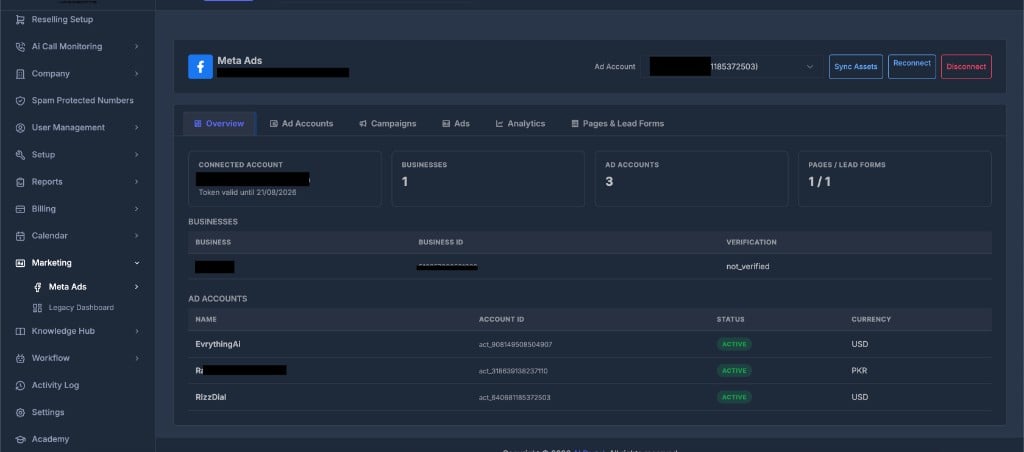 **You will see:**
* **Connected Account** — Facebook name and token expiry
* **Businesses / Ad Accounts / Pages** — summary counts
* Tables listing businesses and ad accounts with status and currency
Numbers look wrong? Click **Sync Assets**.
***
## 💼 Ad Accounts
Pick the ad account for campaigns, ads, and analytics.
**You will see:**
* **Connected Account** — Facebook name and token expiry
* **Businesses / Ad Accounts / Pages** — summary counts
* Tables listing businesses and ad accounts with status and currency
Numbers look wrong? Click **Sync Assets**.
***
## 💼 Ad Accounts
Pick the ad account for campaigns, ads, and analytics.
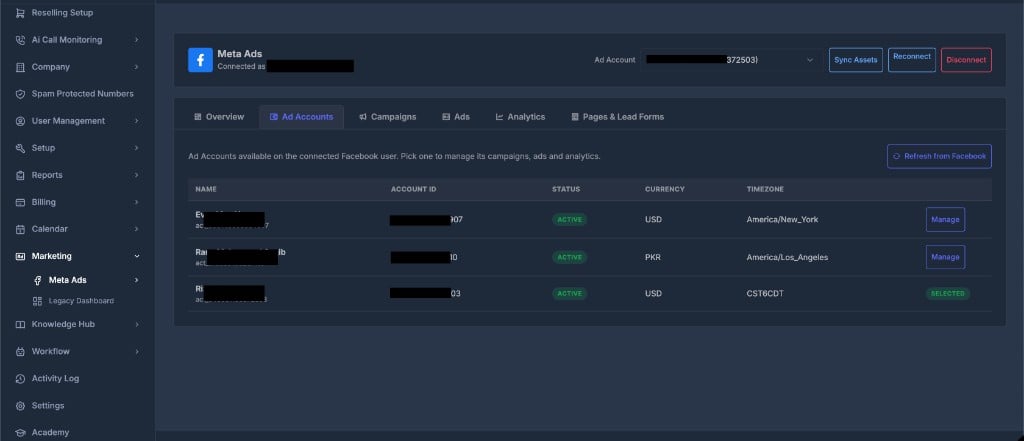 | Column | Meaning |
| ----------------------- | ------------------------------ |
| **Name** | Ad account name |
| **Account ID** | Meta account ID |
| **Status** | Active, Disabled, etc. |
| **Currency / Timezone** | Billing and reporting settings |
* Click **Manage** to use an account
* **Selected** means it is active in the header dropdown
* Click **Refresh from Facebook** to update the list
***
## 📣 Campaigns
Create and control campaigns for the selected ad account.
| Column | Meaning |
| -------------------- | ------------------------------- |
| **Campaign** | Name and Facebook ID |
| **Objective** | Leads, Traffic, Sales, etc. |
| **Status** | Your switch — Active or Paused |
| **Effective Status** | What Facebook is actually doing |
| **Actions** | Rename, Pause, or Activate |
**Create a campaign**
1. Select ad account → **Create Campaign**
2. Enter name and choose objective
3. Click **Create Campaign**
New campaigns start **Paused**. Nothing spends until you click **Activate**.
* Click the **arrow** on a row to expand and view **Ad Sets**
* **Pause** = stop spend fast | **Activate** = confirm to start delivery
***
## 🖼️ Ads
Manage individual ads. Filter by campaign or ad set.
| Column | Meaning |
| ----------------------- | ------------------------------ |
| **Name** | Ad account name |
| **Account ID** | Meta account ID |
| **Status** | Active, Disabled, etc. |
| **Currency / Timezone** | Billing and reporting settings |
* Click **Manage** to use an account
* **Selected** means it is active in the header dropdown
* Click **Refresh from Facebook** to update the list
***
## 📣 Campaigns
Create and control campaigns for the selected ad account.
| Column | Meaning |
| -------------------- | ------------------------------- |
| **Campaign** | Name and Facebook ID |
| **Objective** | Leads, Traffic, Sales, etc. |
| **Status** | Your switch — Active or Paused |
| **Effective Status** | What Facebook is actually doing |
| **Actions** | Rename, Pause, or Activate |
**Create a campaign**
1. Select ad account → **Create Campaign**
2. Enter name and choose objective
3. Click **Create Campaign**
New campaigns start **Paused**. Nothing spends until you click **Activate**.
* Click the **arrow** on a row to expand and view **Ad Sets**
* **Pause** = stop spend fast | **Activate** = confirm to start delivery
***
## 🖼️ Ads
Manage individual ads. Filter by campaign or ad set.
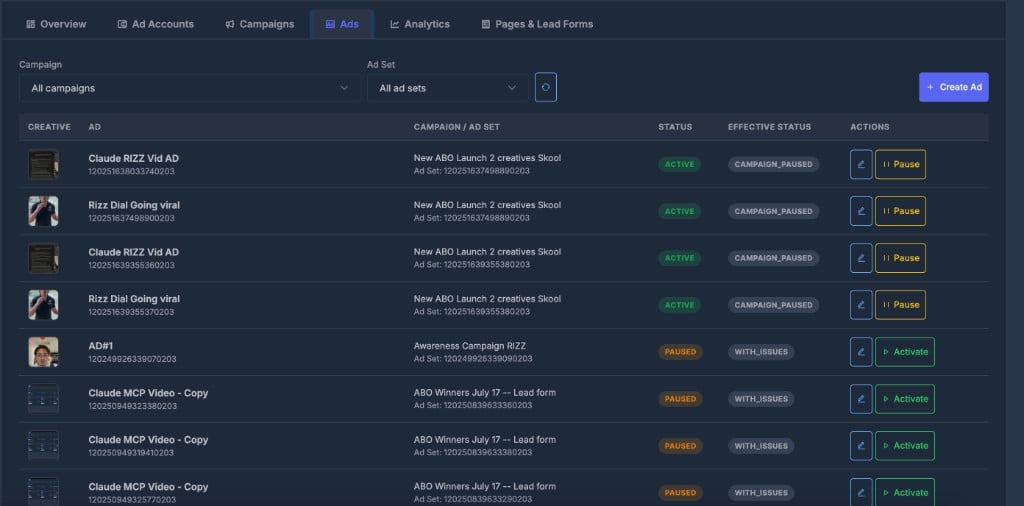 | Column | Meaning |
| --------------------- | -------------------------------------------- |
| **Creative** | Ad image thumbnail |
| **Ad** | Ad name and ID |
| **Campaign / Ad Set** | Parent campaign and ad set |
| **Status** | Active or Paused (your switch) |
| **Effective Status** | Real delivery state (e.g. `CAMPAIGN_PAUSED`) |
| **Actions** | Edit, Pause, or Activate |
**Create an ad**
1. **Create Ad** → enter name
2. Pick **Campaign** → **Ad Set** → **Creative** (must exist in Facebook first)
3. Click **Create Ad**
New ads start **Paused**. Creatives are built in Facebook Ads Manager — AI Sync reuses them, it does not design them.
***
## 📊 Analytics
Performance for the selected ad account and date range.
| Column | Meaning |
| --------------------- | -------------------------------------------- |
| **Creative** | Ad image thumbnail |
| **Ad** | Ad name and ID |
| **Campaign / Ad Set** | Parent campaign and ad set |
| **Status** | Active or Paused (your switch) |
| **Effective Status** | Real delivery state (e.g. `CAMPAIGN_PAUSED`) |
| **Actions** | Edit, Pause, or Activate |
**Create an ad**
1. **Create Ad** → enter name
2. Pick **Campaign** → **Ad Set** → **Creative** (must exist in Facebook first)
3. Click **Create Ad**
New ads start **Paused**. Creatives are built in Facebook Ads Manager — AI Sync reuses them, it does not design them.
***
## 📊 Analytics
Performance for the selected ad account and date range.
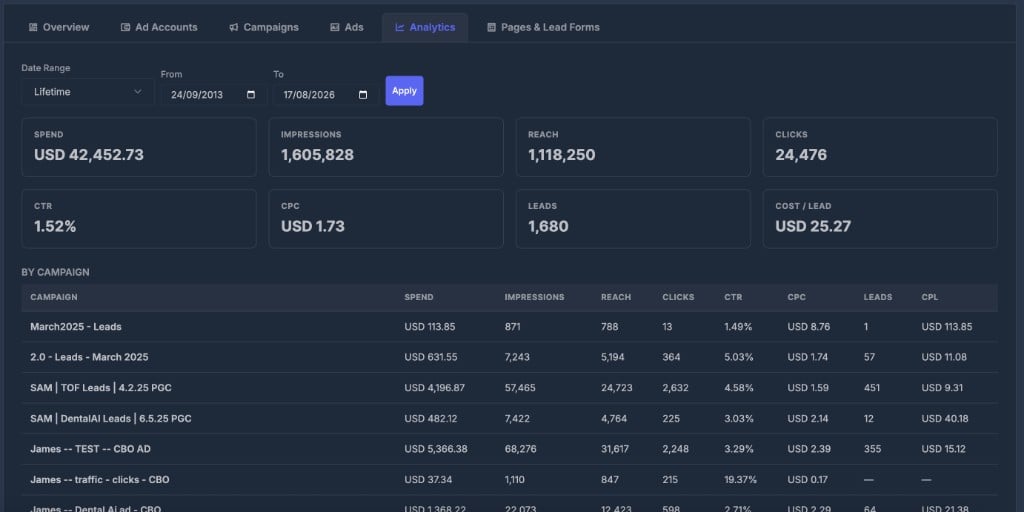 **Filter:** Pick **Date Range** (or custom From/To) → click **Apply**
**Summary cards:** Spend · Impressions · Reach · Clicks · CTR · CPC · Leads · Cost / Lead
**By Campaign table:** Same metrics broken down per campaign.
Use **PowerLists** to see leads that actually arrived in AI Sync. Analytics shows what Facebook reported — they can differ.
***
## 📄 Pages & Lead Forms
Turn Facebook form fills into contacts you can call or text.
**Filter:** Pick **Date Range** (or custom From/To) → click **Apply**
**Summary cards:** Spend · Impressions · Reach · Clicks · CTR · CPC · Leads · Cost / Lead
**By Campaign table:** Same metrics broken down per campaign.
Use **PowerLists** to see leads that actually arrived in AI Sync. Analytics shows what Facebook reported — they can differ.
***
## 📄 Pages & Lead Forms
Turn Facebook form fills into contacts you can call or text.
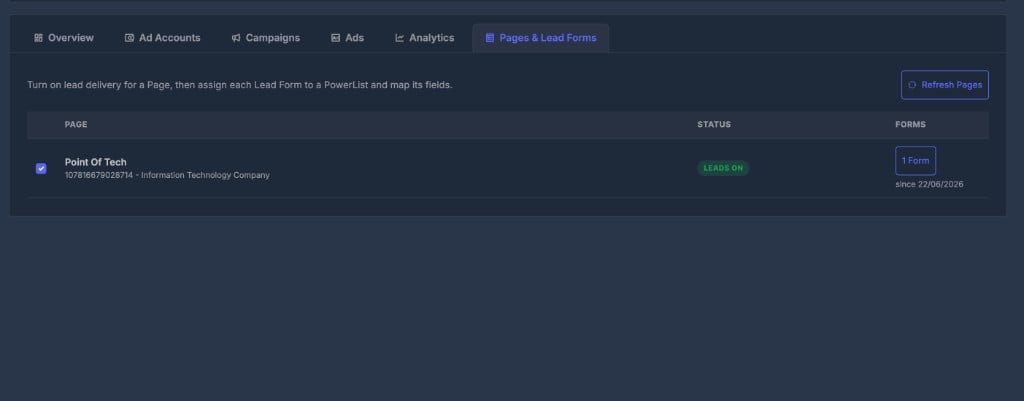 | Column | Meaning |
| ---------- | ------------------------------------ |
| **Page** | Facebook Page name and ID |
| **Status** | **Leads On** or **Off** |
| **Forms** | Number of Lead Forms — click to open |
**For each form:**
1. Turn **Leads On** for the Page
2. Click **Forms** → assign a **PowerList**
3. Click **Map Fields** → match Facebook questions to contact fields → **Save Mapping**
| Facebook question | Map to |
| ------------------ | -------------- |
| Full name | Name fields |
| Phone | Phone |
| Email | Email |
| City / State / Zip | Address fields |
Leads need all four: **Leads On** + **PowerList** + **field mapping** + Facebook connected. Map phone and email for follow-up to work.
| Column | Meaning |
| ---------- | ------------------------------------ |
| **Page** | Facebook Page name and ID |
| **Status** | **Leads On** or **Off** |
| **Forms** | Number of Lead Forms — click to open |
**For each form:**
1. Turn **Leads On** for the Page
2. Click **Forms** → assign a **PowerList**
3. Click **Map Fields** → match Facebook questions to contact fields → **Save Mapping**
| Facebook question | Map to |
| ------------------ | -------------- |
| Full name | Name fields |
| Phone | Phone |
| Email | Email |
| City / State / Zip | Address fields |
Leads need all four: **Leads On** + **PowerList** + **field mapping** + Facebook connected. Map phone and email for follow-up to work.