> ## Documentation Index
> Fetch the complete documentation index at: https://docs.aisync.link/llms.txt
> Use this file to discover all available pages before exploring further.
# Twilio Credentials
> Configure Twilio API credentials and communication settings
## 📞 Bring Your Own Carrier
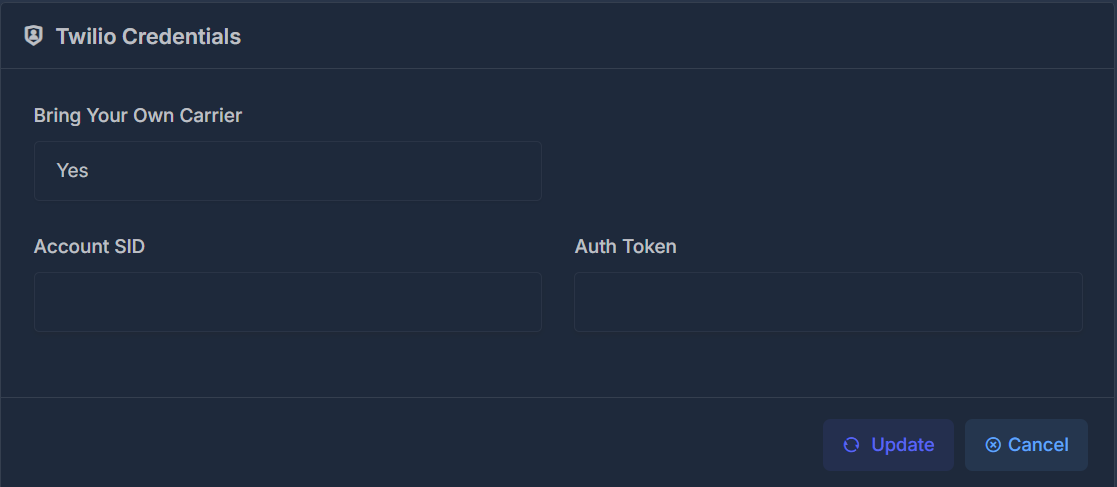
The "Bring Your Own Carrier" option determines whether you want to use your own Twilio account or the platform's default carrier services.
### ⚙️ Available Options
* **Yes** - Use your own Twilio account with your credentials
* **No** - Use the platform's default carrier services
When set to "Yes", you must provide your own Twilio Account SID and Auth Token.
 ## 🔑 Required Credentials
When using your own Twilio carrier, you'll need to provide the following credentials:
### 🆔 Account SID
Your Twilio Account SID is a unique identifier for your Twilio account. This can be found in your Twilio Console dashboard.
### 🔒 Auth Token
Your Twilio Auth Token is a secret key used to authenticate API requests to your Twilio account.
Keep your Auth Token secure and never share it publicly. Treat it like a password.
## 🔑 Required Credentials
When using your own Twilio carrier, you'll need to provide the following credentials:
### 🆔 Account SID
Your Twilio Account SID is a unique identifier for your Twilio account. This can be found in your Twilio Console dashboard.
### 🔒 Auth Token
Your Twilio Auth Token is a secret key used to authenticate API requests to your Twilio account.
Keep your Auth Token secure and never share it publicly. Treat it like a password.