> ## Documentation Index
> Fetch the complete documentation index at: https://docs.aisync.link/llms.txt
> Use this file to discover all available pages before exploring further.
# Webhooks
Webhooks enable real-time communication between AI Sync and external systems by sending HTTP POST requests when specific events occur in your system.
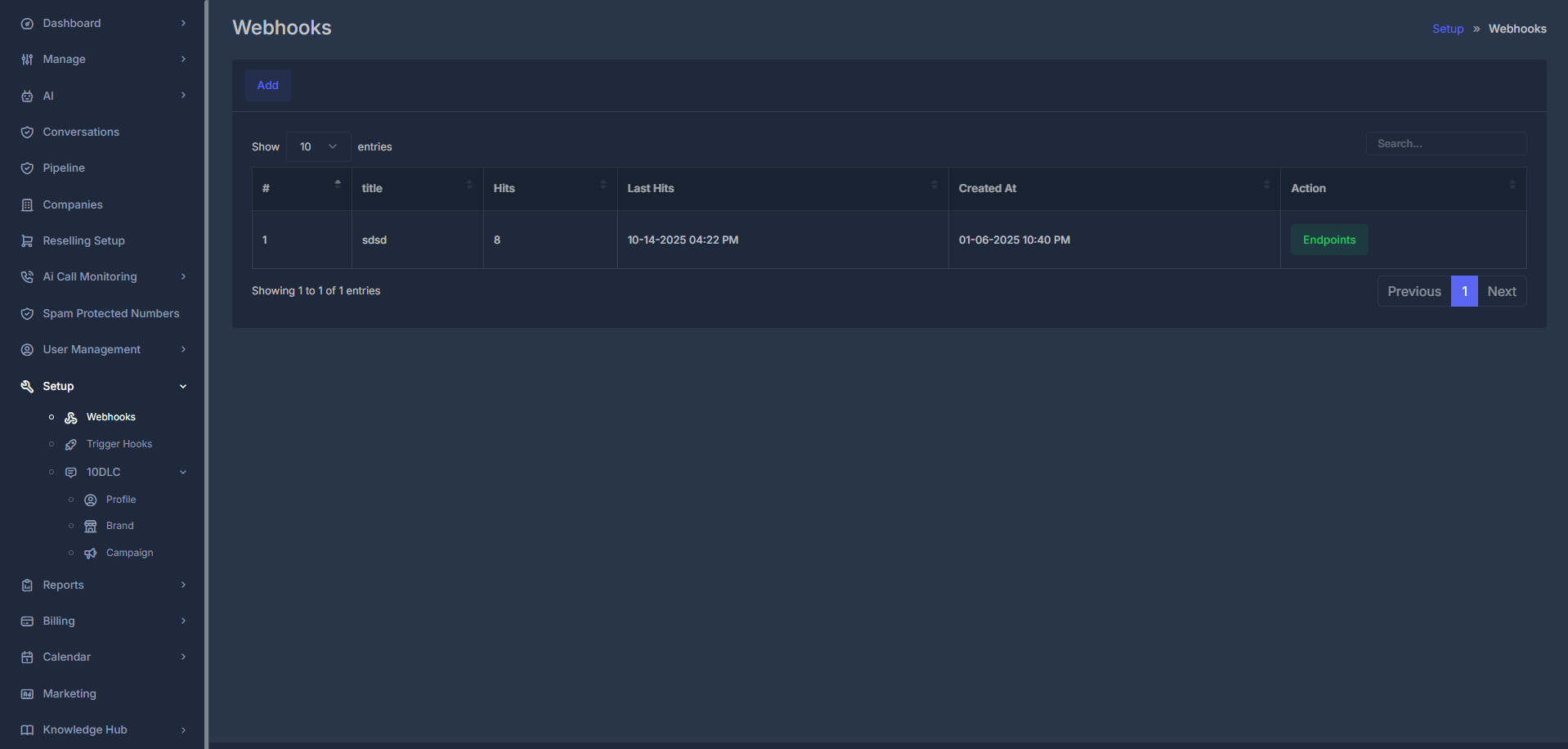 Navigate to **Setup > Webhooks** to manage your webhook configurations.
### 📊 Webhook Table Overview
| Column | Description | Example |
| -------------- | ----------------------------- | ----------------------------------- |
| **#** | Sequential webhook ID | `1`, `2`, `3` |
| **Title** | Webhook name/identifier | `CRM Integration`, `Analytics Sync` |
| **Hits** | Total number of webhook calls | `1,247` |
| **Last Hit** | Most recent webhook execution | `2025-01-15 14:30:25` |
| **Created At** | Webhook creation timestamp | `2025-01-10 10:40 PM` |
| **Action** | Management options | Edit, Delete, View Endpoints |
### ⚡ Quick Actions
Create new webhook endpoints for your integrations
Monitor webhook performance and delivery status
### 👁️ Viewing Webhook Details
When you click a webhook entry in the table, you'll see a detailed view showing all of its configuration and delivery parameters.
Navigate to **Setup > Webhooks** to manage your webhook configurations.
### 📊 Webhook Table Overview
| Column | Description | Example |
| -------------- | ----------------------------- | ----------------------------------- |
| **#** | Sequential webhook ID | `1`, `2`, `3` |
| **Title** | Webhook name/identifier | `CRM Integration`, `Analytics Sync` |
| **Hits** | Total number of webhook calls | `1,247` |
| **Last Hit** | Most recent webhook execution | `2025-01-15 14:30:25` |
| **Created At** | Webhook creation timestamp | `2025-01-10 10:40 PM` |
| **Action** | Management options | Edit, Delete, View Endpoints |
### ⚡ Quick Actions
Create new webhook endpoints for your integrations
Monitor webhook performance and delivery status
### 👁️ Viewing Webhook Details
When you click a webhook entry in the table, you'll see a detailed view showing all of its configuration and delivery parameters.
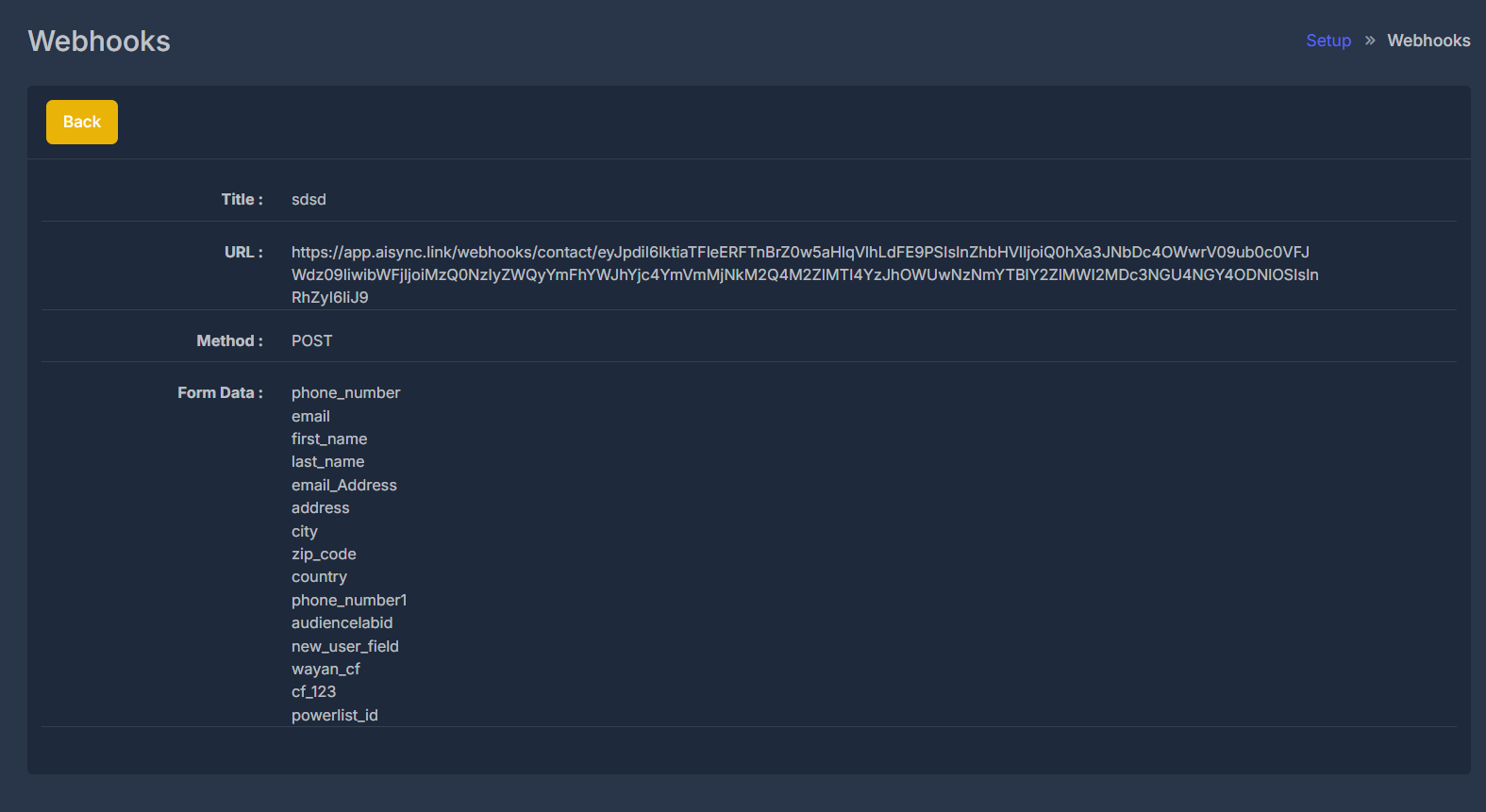 This detail page includes:
* **Title:** The name of the webhook for easy identification.
* **URL:** The full endpoint address where HTTP POST requests are sent.
* **Method:** The HTTP method used (always `POST`).
* **Form Data:**\
A complete list of fields included in the payload sent to your endpoint.
This detail page includes:
* **Title:** The name of the webhook for easy identification.
* **URL:** The full endpoint address where HTTP POST requests are sent.
* **Method:** The HTTP method used (always `POST`).
* **Form Data:**\
A complete list of fields included in the payload sent to your endpoint.
*Examples:* `phone_number`, `email`, `first_name`, `last_name`, `address`, `city`, `country`,`new_user_field`, `powelist_id`, `wayan_cf`, and more....
This view allows you to:
* Verify the endpoint URL and method used
* See exactly which form fields are transmitted to your external system
* Easily copy field names for integration into your endpoints
Click the yellow **Back** button at the top to return to the main Webhooks overview table.
*Use this page whenever you need to audit, troubleshoot, or integrate with your webhooks more precisely.*
## 🔄 Webhook Workflow
An action happens in AI Sync (call ends, agent responds, etc.)
System identifies configured webhooks for the event type
POST request with event data sent to your endpoint URL
Your system processes the data and sends acknowledgment
Failed requests are retried with exponential backoff
## 🎛️ Webhook Configuration
**Creating a New Webhook**
 **How to Add a Webhook:**
1. **Go to Setup > Webhooks**\
Click the yellow **Add** button to open the Add Webhook form.
2. **Fill out Webhook Details:**
* **Title:**\
Enter a clear, descriptive name for your webhook.
**How to Add a Webhook:**
1. **Go to Setup > Webhooks**\
Click the yellow **Add** button to open the Add Webhook form.
2. **Fill out Webhook Details:**
* **Title:**\
Enter a clear, descriptive name for your webhook.
*Example:* `Home`
* **Powelist:**\
Select the appropriate option from the Powelist dropdown. This field lets you choose a predefined set or type related to your webhook logic.
* **Endpoint:**\
Use the dropdown menu to select the desired endpoint or event trigger for your webhook.\
*Example:* `Contact` , `Contact Delete`
*Tip: You can select a single or multiple event types as needed for your integration.*
After filling in all fields, click the purple **Submit** button to complete adding the webhook.
> **Tip:** Hover over the event field to see additional info for each webhook trigger.
## 🎪 Available Webhook Events
### 📞 Call Events
**Event**: `call.started`
**Triggered**: When a call begins
**Use Cases**: Call logging, real-time monitoring
**Event**: `call.ended`
**Triggered**: When a call completes
**Use Cases**: Call analytics, CRM updates
**Event**: `call.answered`
**Triggered**: When a call is answered
**Use Cases**: Connection tracking, response rates
**Event**: `call.transferred`
**Triggered**: When a call is transferred
**Use Cases**: Transfer logging, agent routing
### 🤖 Agent Events
**Event**: `agent.created`
**Triggered**: When a new AI agent is created
**Use Cases**: Inventory management, provisioning
**Event**: `agent.updated`
**Triggered**: When agent configuration changes
**Use Cases**: Configuration sync, audit trails
**Event**: `agent.status_changed`
**Triggered**: When agent goes online/offline
**Use Cases**: Availability tracking, monitoring
**Event**: `agent.performance`
**Triggered**: Performance threshold events
**Use Cases**: Quality monitoring, alerts
### 📊 Campaign Events
**Event**: `campaign.started`
**Triggered**: When a campaign begins
**Use Cases**: Campaign tracking, notifications
**Event**: `campaign.completed`
**Triggered**: When a campaign finishes
**Use Cases**: Results processing, reporting
**Event**: `lead.generated`
**Triggered**: When a new lead is created
**Use Cases**: CRM integration, lead routing
**Event**: `appointment.scheduled`
**Triggered**: When an appointment is booked
**Use Cases**: Calendar sync, confirmations
### 💬 SMS Events
**Event**: `sms.sent`
**Triggered**: When an SMS is delivered
**Use Cases**: Delivery tracking, billing
**Event**: `sms.received`
**Triggered**: When an SMS is received
**Use Cases**: Response handling, conversations
**Event**: `sms.failed`
**Triggered**: When SMS delivery fails
**Use Cases**: Error handling, retry logic
**Event**: `sms.replied`
**Triggered**: When recipient replies to SMS
**Use Cases**: Conversation tracking, engagement
## 📦 Webhook Payload Structure
**Standard Payload Format**
All webhooks follow a consistent JSON structure:
```json theme={null}
{
"event": "call.ended",
"timestamp": "2025-01-15T14:30:25.123Z",
"webhook_id": "wh_123456789",
"data": {
// Event-specific data
},
"metadata": {
"version": "1.0",
"signature": "sha256=abc123..."
}
}
```
**Call Event Payload Example**
```json theme={null}
{
"event": "call.ended",
"timestamp": "2025-01-15T14:30:25.123Z",
"webhook_id": "wh_123456789",
"data": {
"call_id": "call_987654321",
"agent_id": "agent_abc123",
"caller_number": "+1234567890",
"called_number": "+0987654321",
"call_duration": 180,
"call_status": "completed",
"call_direction": "outbound",
"recording_url": "https://recordings.ai-sync.com/call_987654321.mp3",
"transcription": "Hello, this is John calling about...",
"sentiment": "positive",
"disposition": "interested",
"tags": ["qualified", "follow-up"],
"custom_fields": {
"lead_score": 85,
"next_action": "schedule_demo"
}
},
"metadata": {
"version": "1.0",
"signature": "sha256=abc123def456..."
}
}
```
## 🔒 Security Best Practices
**Webhook Verification**
Always verify webhook signatures to ensure authenticity:
```javascript theme={null}
const crypto = require('crypto');
function verifyWebhookSignature(payload, signature, secret) {
const expectedSignature = crypto
.createHmac('sha256', secret)
.update(payload)
.digest('hex');
return crypto.timingSafeEqual(
Buffer.from(signature, 'hex'),
Buffer.from(expectedSignature, 'hex')
);
}
// Middleware to verify webhooks
app.use('/webhook/*', (req, res, next) => {
const signature = req.headers['x-webhook-signature'];
const payload = JSON.stringify(req.body);
if (!verifyWebhookSignature(payload, signature, WEBHOOK_SECRET)) {
return res.status(401).json({ error: 'Invalid signature' });
}
next();
});
```
Implement rate limiting to prevent abuse:
```javascript theme={null}
const rateLimit = require('express-rate-limit');
const webhookLimiter = rateLimit({
windowMs: 15 * 60 * 1000, // 15 minutes
max: 1000, // Limit each IP to 1000 requests per windowMs
message: 'Too many webhook requests'
});
app.use('/webhook', webhookLimiter);
```
Always use HTTPS endpoints for webhook URLs:
```javascript theme={null}
// ✅ Correct - HTTPS endpoint
const webhookUrl = 'https://api.yoursite.com/webhook/ai-sync';
// ❌ Incorrect - HTTP endpoint (insecure)
const webhookUrl = 'http://api.yoursite.com/webhook/ai-sync';
```
**Error Handling**
AI Sync implements exponential backoff for failed webhooks:
* **Attempt 1**: Immediate
* **Attempt 2**: 30 seconds delay
* **Attempt 3**: 2 minutes delay
* **Attempt 4**: 8 minutes delay
* **Attempt 5**: 32 minutes delay
* **Final**: Webhook marked as failed after 5 attempts
Return appropriate HTTP status codes:
```javascript theme={null}
app.post('/webhook', (req, res) => {
try {
// Process webhook data
processWebhookData(req.body);
// Success response
res.status(200).json({
received: true,
timestamp: new Date().toISOString()
});
} catch (error) {
// Log error for debugging
console.error('Webhook processing error:', error);
// Return error status
res.status(500).json({
error: 'Internal processing error',
message: error.message
});
}
});
```
## 📊 Monitoring & Debugging
**Webhook Logs**
Monitor webhook delivery and performance:
* Success/failure rates
* Response times
* Error codes and messages
* Retry attempts
* Average response time
* Peak load handling
* Throughput statistics
* Error rate trends
**Testing Webhooks**
Use tools like ngrok for local testing:
```bash theme={null}
# Install ngrok
npm install -g ngrok
# Start your local server
node webhook-server.js
# Expose local server
ngrok http 3000
# Use the HTTPS URL for webhook configuration
# https://abc123.ngrok.io/webhook
```
Test with sample webhook payloads:
```bash theme={null}
curl -X POST https://your-webhook-url.com/webhook \
-H "Content-Type: application/json" \
-H "X-Webhook-Signature: sha256=test-signature" \
-d '{
"event": "call.ended",
"timestamp": "2025-01-15T14:30:25.123Z",
"data": {
"call_id": "test_call_123",
"call_duration": 120,
"sentiment": "positive"
}
}'
```