Agency settings is owner-only. Set these up once. Every client you add can use them.
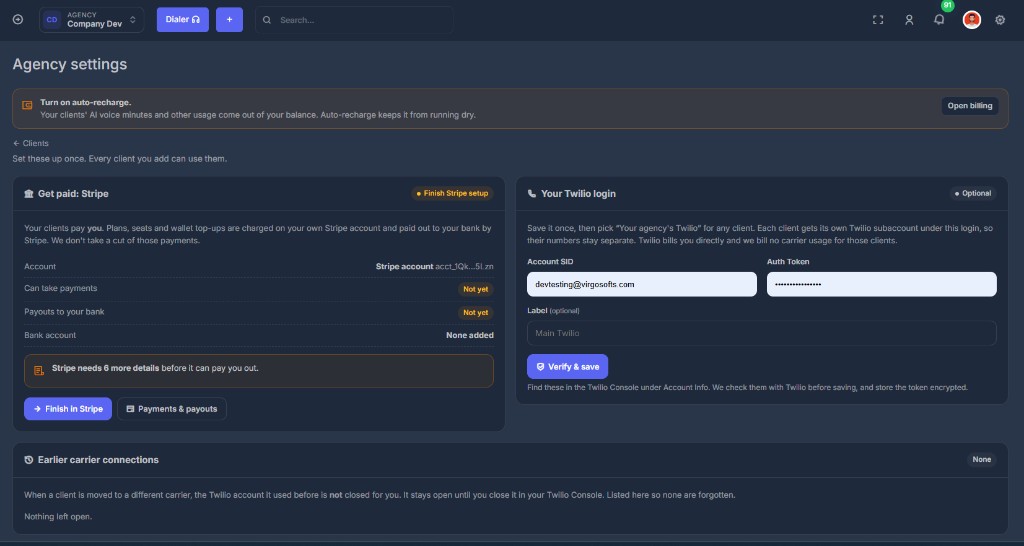
💳 Get paid: Stripe#
Your clients pay you. Plans, seats, and wallet top-ups are charged on your own Stripe account and paid out to your bank by Stripe. We do not take a cut of those payments.
| Status on the card | What it means |
|---|---|
| Finish Stripe setup / needs attention | Connected, but Stripe still wants details |
| Not connected | You have not connected Stripe yet |
| Active | Can take payments and pay out |
Not connected yet? Pick Link my existing Stripe account if you already use Stripe, or Create a new Stripe account if you don't. Step by step: Link your Stripe account.
After you connect, the card shows:
- The Stripe account name and id
- Can take payments — Yes or Not yet
- Payouts to your bank — Yes or Not yet
- Bank account — bank name and last four, or None added
If Stripe still needs information, the page says how many details are left. Finish in Stripe opens Stripe's form. Payments & payouts opens Payments. Use a different Stripe account and Disconnect are explained in Link your Stripe account.
Clients can still be created and can use the product while Stripe is unfinished. Their card charges just cannot reach your bank yet.
📞 Your Twilio login (optional)#
Save it once, then pick Your agency's Twilio for any client.
Each client gets its own Twilio subaccount under this login, so their numbers stay separate. Twilio bills you directly. We bill no carrier usage for those clients.
| Field | Where to find it |
|---|---|
| Account SID | Twilio Console → Account Info. Starts with AC |
| Auth Token | Same page. We check it with Twilio before saving and store it encrypted |
| Label | Optional. Example: Main Twilio |
Verify & save. A verified login shows a masked SID and the date it was checked.
Do not paste a client's Twilio here. Client-owned Twilio is entered on that client's Phone carrier step, not on Agency settings.
🕘 Earlier carrier connections#
When a client is moved to a different carrier, the Twilio account they used before is not closed for you. It stays open until you close it in the Twilio Console.
This list exists so none are forgotten: client name, label, masked SID, and the date it was replaced.