Open on the Clients table (and Open account in the wizard) switches you into that client's workspace.
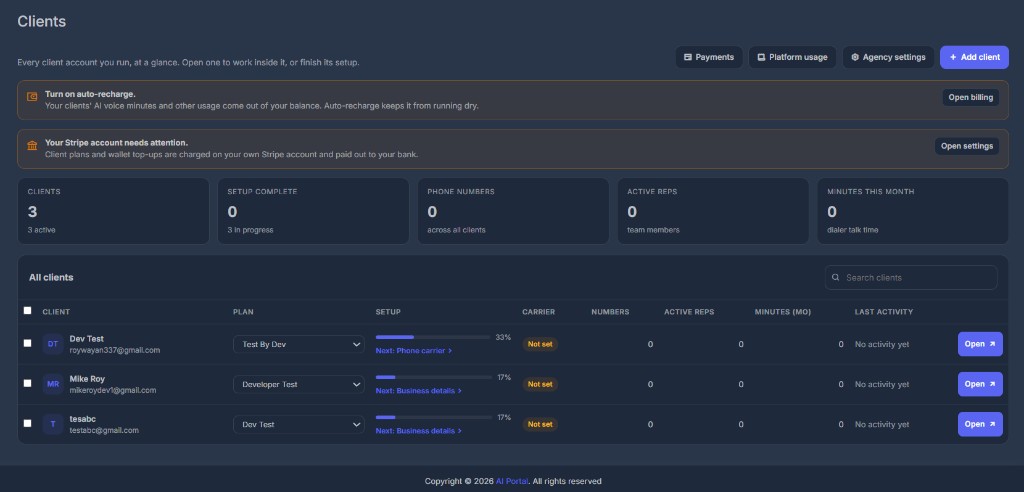
You are not logging in as them with their password. The product puts you inside their account so you can finish setup, buy numbers, add reps, or fix something. They keep their own login.
👁️ What you see inside#
A banner at the top of the page:
Viewing [client] as [your agency]
Choose Back to my account at the top of the page to return to your agency with your own sign-in. Agency owners and staff who can open clients both have this shortcut.

The left sidebar changes to what that client would see. You do not keep the Agency Reseller menu while you are inside a client. That is on purpose: you are looking at their product, not yours.
Clients use the agency's platform brand. Their workspace card shows their own saved logo or their initials.
🔄 The account switcher#
In the new look, the workspace card in the sidebar opens the account switcher.
- While you are on the agency, it shows Agency and your agency name
- While you are inside a client, it shows Client account and that client's name
Open it to search accounts, jump to another client, or go Back to [agency]. Current marks the account you are viewing. Suspended marks a suspended account. Use the up and down arrow keys to move through search results, Enter to open the selected account, and Escape to close the picker.
Use the switcher when you are bouncing between three clients. Use Open on the Clients table when you are starting from the list.
🔐 What you can and cannot do#
You can do the work you would do in their account: numbers, team, integrations, dialer, AI, settings.
Money that belongs to the agency (Stripe payouts, saving a Twilio login, creating plans) stays on the agency pages.
Owner-only agency pages (Payments, Agency settings) are hidden from agency staff, even when they can open clients.
Prefer chat? Connect your AI assistant and name the client in what you ask. See Work in clients by chat.
↩️ Coming back#
Use Back to my account before closing the tab so the next page opens in your agency.