

⚙️ Configuration
Update your incoming call route here: 👉 Profile → Personal Settings: https://app.aisync.link/profile- Open the Personal Settings tab.
- Find the Incoming Call field.
- Choose your preferred routing option.
- Click Update to save (or Cancel to discard changes).
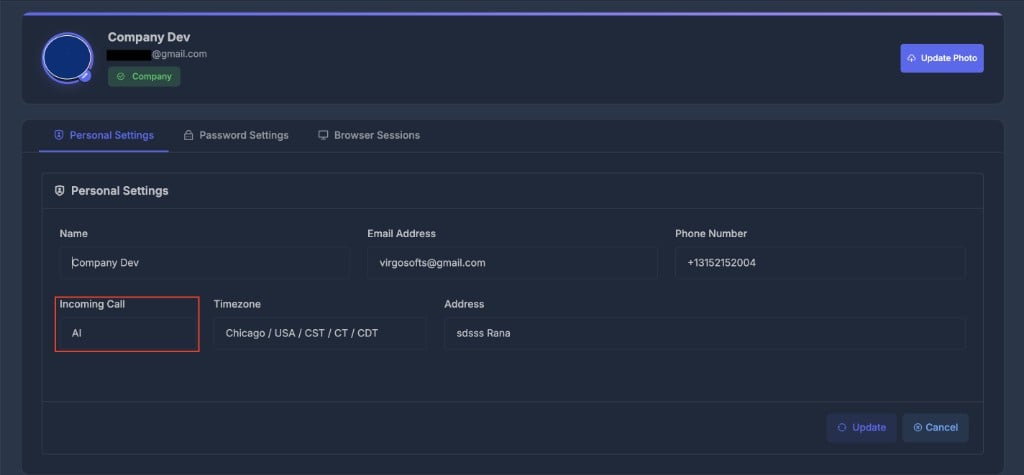
📞 Incoming Call options
Dialer
Calls ring in the dialer interface so you or your team can answer them from within the app.
Phone
Calls forward to your linked phone number.
AI
Calls are routed straight to an AI agent, which handles the conversation automatically.
Dialer + AI
Calls first ring the dialer. If unanswered, the call goes to the AI agent as fallback.
🔍 How User Assignment Works
Calls are always matched to a user before the selected Incoming Call option is applied. The system uses this logic (in priority order):1️⃣ Last Outbound Call
- If you have recently called the incoming number, you are selected as the responsible user.
2️⃣ Assigned Number
- If the “To” number (the system DID receiving the call) is strictly assigned to a user, that user is chosen next.
3️⃣ PowerList Membership
- If the caller belongs to a PowerList that you own, you receive the inbound call.
4️⃣ Company Default
- If none of the above apply, the call defaults to the company’s fallback user.
As soon as a match is found, the system assigns the user, maximizing relevance and continuity.
🤖 If AI Is Involved
If you pick an option that uses an AI agent (AI, or Dialer + AI as fallback):-
Contact exists in a PowerList with an AI agent?
→ That PowerList’s agent answers. -
Caller is unknown (not in any PowerList)?
→ The default PowerList AI agent handles the call.