Connect your Facebook account once. After that you can talk to your AI assistant the way you'd talk to a senior media buyer:
Launch a lead campaign for a free inspection, $100 a day, 25 miles around Phoenix. Show me the plan first.
Which ads should I turn off this week, and which should I scale?
Write my client's weekly ads report, judged on booked appointments.
Your assistant reads your real ad accounts, builds the campaign, shows you exactly what will run, and only starts spending when you say yes.
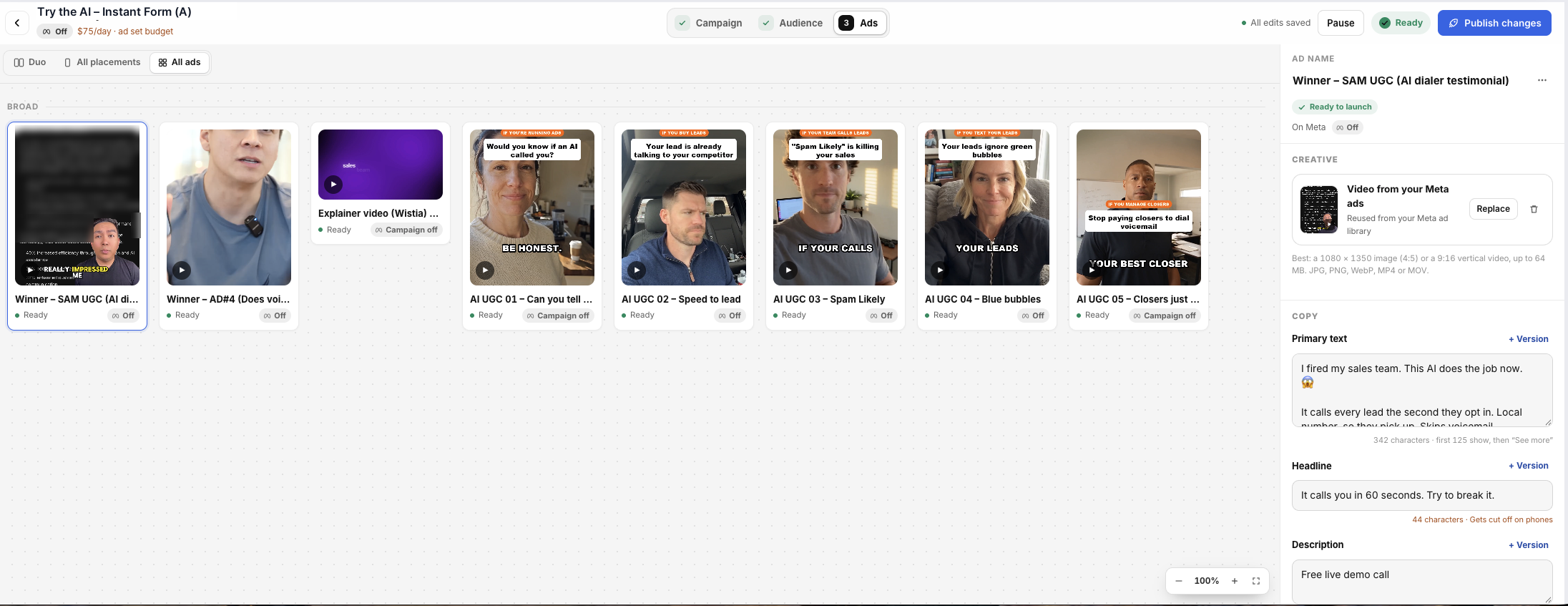
A media buyer comes built in#
Your assistant comes with a media buying playbook that works the way a top media buyer does. You don't install anything or switch it on. Just ask for ads work.
| It knows how to | What that means for you |
|---|---|
| Set up tracking before spending | It checks that your leads really arrive and that bookings go back to Meta, so Meta finds buyers instead of just people who fill in forms. |
| Structure the account | It uses fewer, bigger ad sets and broad targeting so Meta can learn, and it names everything so anyone can read it. |
| Do the budget math | It sets a daily budget big enough for Meta to learn, and tells you plainly when your budget is too small. |
| Read results in order | It finds the first thing that's broken (reach, the ad, the form, lead quality or the sale) and fixes that first. |
| Kill, keep and scale | It follows written rules: pause losers after a fair spend, leave learning ads alone, and raise winners 20 to 30 percent at a time. |
| Report on what pays | It judges ads on cost per booked and showed appointment, not on likes or cheap leads. |
| Run many clients safely | For agencies, it confirms which client and ad account every time, and never mixes budgets or audiences between clients. |
It also has playbooks for the creative: image ads, video ad scripts, copy and offers.
Nothing spends without your yes. New campaigns, ad sets and ads are always created paused. Before an Ads Manager launch, your assistant shows you the ad accounts, the budget per day and where the ads will run. The launch only goes ahead with an approval from that summary, and the approval expires after 30 minutes. Your assistant is also told to ask you before it turns an ad on or makes a big budget change. For extra safety, say "Show me exactly what you'll change before you do it."
Choose your path#
You connect your own Facebook once. Each client then links their business to yours with a secure link. They keep ownership, their ads bill to their own card, and you run everything from one place.
Connect your own Facebook
Go to Marketing → Meta Ads → Connect Facebook and sign in with a Facebook login that's an admin on your agency's Business Manager. Then click Sync Assets.
Copy your client link
Open the Overview tab. In the Businesses table, find your agency's business and click External Link. The link is copied for you.
You can also ask your assistant: "Give me my Meta client link."
Send it to your client
Send the link in its own message, by itself. It's long, and if even one character is cut off, it won't open. If it breaks in WhatsApp or a text, send it by email.
The link works for 7 days. Get a fresh one any time from the same button.
Your client clicks through (about 2 minutes)
- Enters their business name.
- Clicks Connect with Meta, picks their business portfolio and ticks every ad account and Page you'll manage.
- Adds your business as a partner in their Meta Business Settings. The page shows them each click, and your Business ID is ready to copy.
They need to be an admin on their own Business Manager.
Check it landed
Ask your assistant: "List my Facebook connections." Each client shows up as its own connection, with their ad accounts and Pages.
Run their ads by chat
Always name the client in your request. Your assistant confirms which client and ad account before it changes anything.
Prompts agencies use
- "For Smith Roofing, read their ad account and tell me what's wrong, in order of what to fix first."
- "For Smith Roofing, plan a lead campaign: $150 a day, free inspection offer, 25 miles around Tampa. Show me the plan, don't launch."
- "For every client, show spend, leads, cost per lead and booked appointments for the last 7 days."
- "For Bay Dental, pause any ad that spent over $80 with no lead. Show me the list first."
- "Write Bay Dental's weekly report: what we spent, what it booked, what we changed and what's next."
Agree each client's daily budget, and who approves increases, before you launch. Your assistant asks for that approval every time. Ask it to keep a short change log per client, so any buyer on your team can pick up an account.
See your ads before they run#
Every ad shows a preview of how it will look on Facebook and Instagram, on a phone and on a desktop, before you spend a dollar.
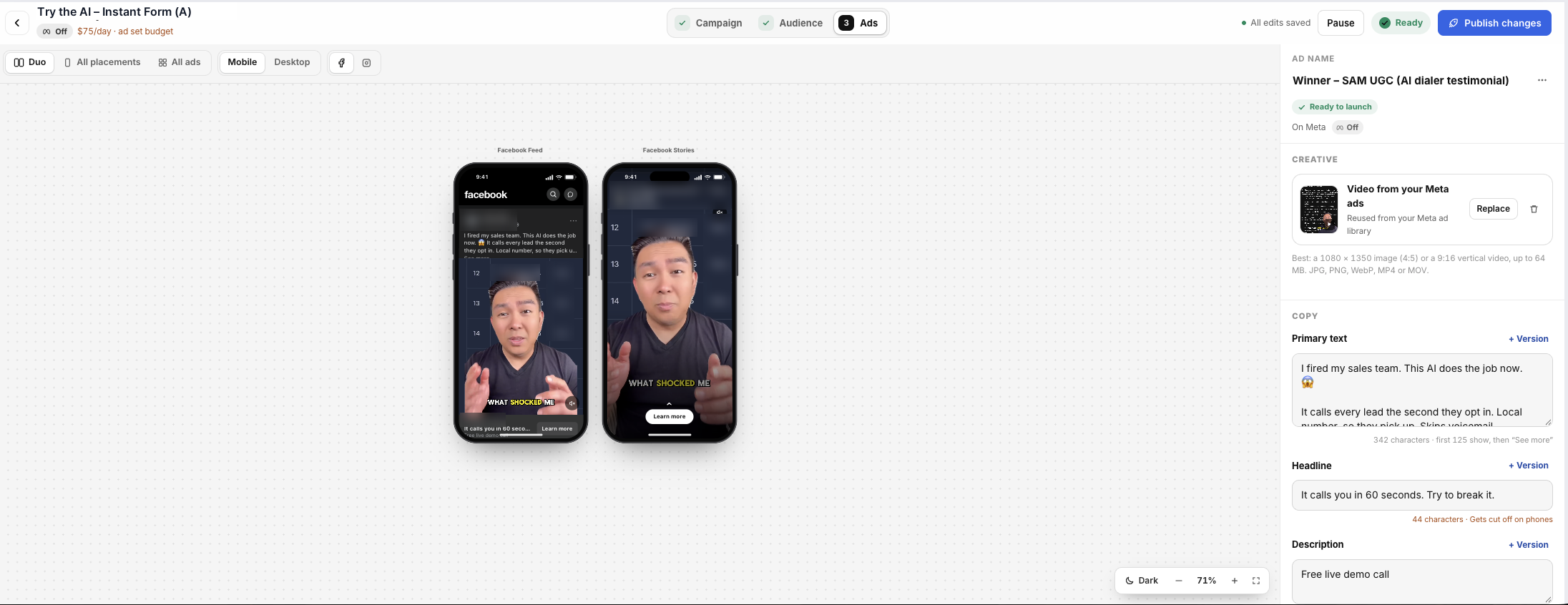
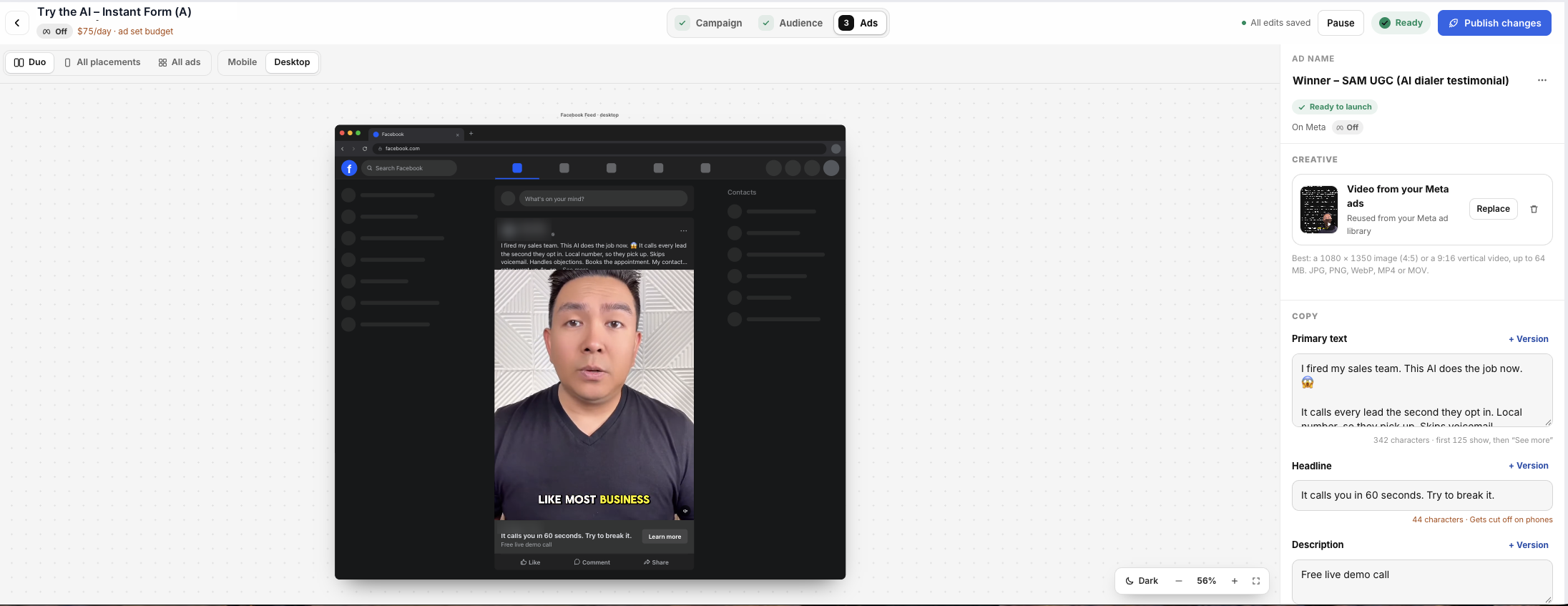
You can click through all of this yourself in Ads Manager, or ask your assistant to do it. They work on the same campaigns.
What your assistant can do with your ads#
| Area | Ask it to |
|---|---|
| Accounts | List your Facebook connections, ad accounts, Pages and Instant Forms, and refresh them from Facebook. |
| Campaigns | Create campaigns, ad sets and ads (always paused), rename them, pause them, and turn them on after you confirm. |
| Budgets and targeting | Change an ad set's budget, schedule, locations and audience. |
| Creative | Upload images and videos, build ads from them, duplicate winners and make new versions with fresh hooks. |
| Results | Read spend, reach, clicks, leads and cost per lead for any date range, by campaign, ad set or ad. |
| Leads | Turn on lead delivery, send each form into a PowerList and map the fields. |
| Conversions | Send leads, bookings and sales back to Meta with your Pixel, so Meta optimizes for real customers. See Meta Pixel & Conversions. |
| The truth | Compare what Facebook reports with what really arrived, booked and showed in your account. |
Google, TikTok, Snapchat and LinkedIn ad accounts work through the same assistant once they're connected in Settings.
Good to know#
Who pays for the ads?
The ad spend is billed by Meta to the payment method on the ad account. For agency clients, that's the client's own card on their own ad account, so the spend stays theirs and they can see it.
Can it spend money without asking?
Everything new is created paused, so creating never spends. An Ads Manager launch is locked until you approve its summary. Turning an ad on or raising a budget is something your assistant is told to ask you about first, and it says "Nothing is live yet" until you confirm. If you want to be sure, ask it to show you the change before making it. See What your assistant can do.
The client link says it's invalid or won't open
The link was probably cut short when it was pasted. Send it again on its own, or by email. If it's more than 7 days old, copy a fresh one from Meta Ads → Overview → External Link.
My ad accounts or Pages are missing
Click Sync Assets, or ask your assistant to refresh from Facebook. Make sure the Facebook login you used is an admin on that Business Manager. A personal login without business access shows an empty list. If Facebook asks you to sign in again, click Reconnect on the Meta Ads page.
Facebook says my leads are different from what I see here
That's normal. Facebook counts form fills. AI Sync counts the leads that really arrived, then follows them to booked, showed and sold. Your assistant uses your account's numbers to make decisions, and points out a large gap so you can fix the lead delivery.
Housing, jobs, credit or politics
These are special ad categories in Meta. They limit targeting by age, gender, ZIP code and interests. Your assistant checks for this before launch and plans broader audiences when needed.