Carriers need your business registered before you can text people. Instead of filling in forms and guessing why a registration was rejected, connect your AI assistant and ask it to register my business for texting. It walks you through four things, in order, and sends nothing for review until every check passes.
Connect your assistant first: Connect your AI assistant. The owner or an admin can save details and submit. Everyone on the team can see where it stands.
🧭 The four steps#
- Tell it about your business. Legal name exactly as on your tax letter, business type, address, website, email, phone, the person authorised to register, and your 9-digit EIN. Anything already in your business profile is filled in for you. Your EIN is stored encrypted and only its last 4 digits are ever shown back.
- Describe how you text. What you text people about, how someone agrees to get texts, the exact consent words they see, and 2 to 5 example messages.
- Run the compliance check. AI Sync reads your website and your answers against what carriers look for. Every problem comes with a plain fix and wording you can paste, such as a privacy policy section or a consent line.
- Submit. Submitting runs the whole check again. If anything fails, nothing is sent and you are told what to fix.
Try asking:
- "Register my business for texting."
- "Where is my texting registration?"
- "Run the texting check again. I fixed the privacy page."
✅ What the check looks at#
| Area | What has to be true |
|---|---|
| Business | Legal name, a valid EIN, a street address (no PO box), state and ZIP, phone, authorised contact and email. A free email address such as Gmail gets a warning. |
| Website | It loads on your own domain (not a social page or link-in-bio), isn't a parked or placeholder page, shows your business name, has a privacy policy that says you don't share phone numbers for marketing, has a terms page, and describes your texts: how often, "Msg & data rates may apply", STOP and HELP. It uses https. |
| Consent | A phone-number form that people use to sign up, with a texting checkbox that is unchecked and optional, and wording that names your business and the disclosures above. If people agree some other way (by phone, on paper, by keyword), you need a public link that proves it. You also confirm that you only text people who agreed and that your details are true. |
| Messages | A use case, a description naming your business, 2 to 5 sample texts that name your business, an opt-out line such as "Reply STOP to opt out", no link shorteners, and no content carriers refuse (lead-list resale, debt or credit repair, cannabis, firearms, gambling, adult content, multi-level marketing). Alcohol, tobacco and vape businesses need an age check at sign-up. |
If your website builds its pages with JavaScript and the check can't read them, it says so and tells you what to send instead of calling the page empty.
🚦 Where it stands#
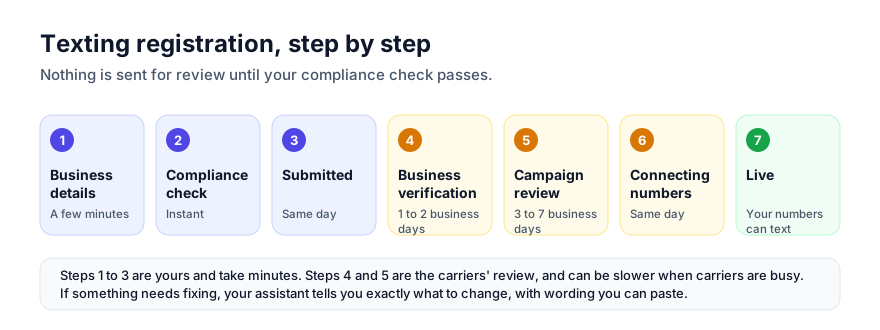
Ask at any time. You get a headline, the next step, and each stage marked done, current, upcoming or needs attention, with how long it usually takes:
| Stage | What happens | Usually |
|---|---|---|
| Business details | You tell us about your business and how you text. | A few minutes |
| Compliance check | We check your website, consent and sample messages. | Instant |
| Submitted | Your registration is sent for review. | Same day |
| Business verification | Carriers confirm your legal name, EIN and address. | 1 to 2 business days |
| Campaign review | Carriers review how people opt in and the messages you send. | 3 to 7 business days, up to 2 to 3 weeks when busy |
| Connecting your numbers | We attach your numbers to your approved campaign. | Same day |
| Live | Your numbers can text your customers. |
If a carrier asks for a change, your assistant explains it in plain words and resubmits the corrected details. A registration can also be put on hold while we verify the business. We reach out if we need anything.
🏢 Agencies#
Working inside a client by chat, submitting a texting registration is a spend, so it is the agency owner's alone and asks for a yes first. See Work in clients by chat.