The Lead Agent is one AI that works every lead you give it, on its own, every day.
For each lead it reads everything you know, decides what to do next, does it, and plans its own next touch. You don't build a workflow, start a campaign or add a tag. New leads join on their own.
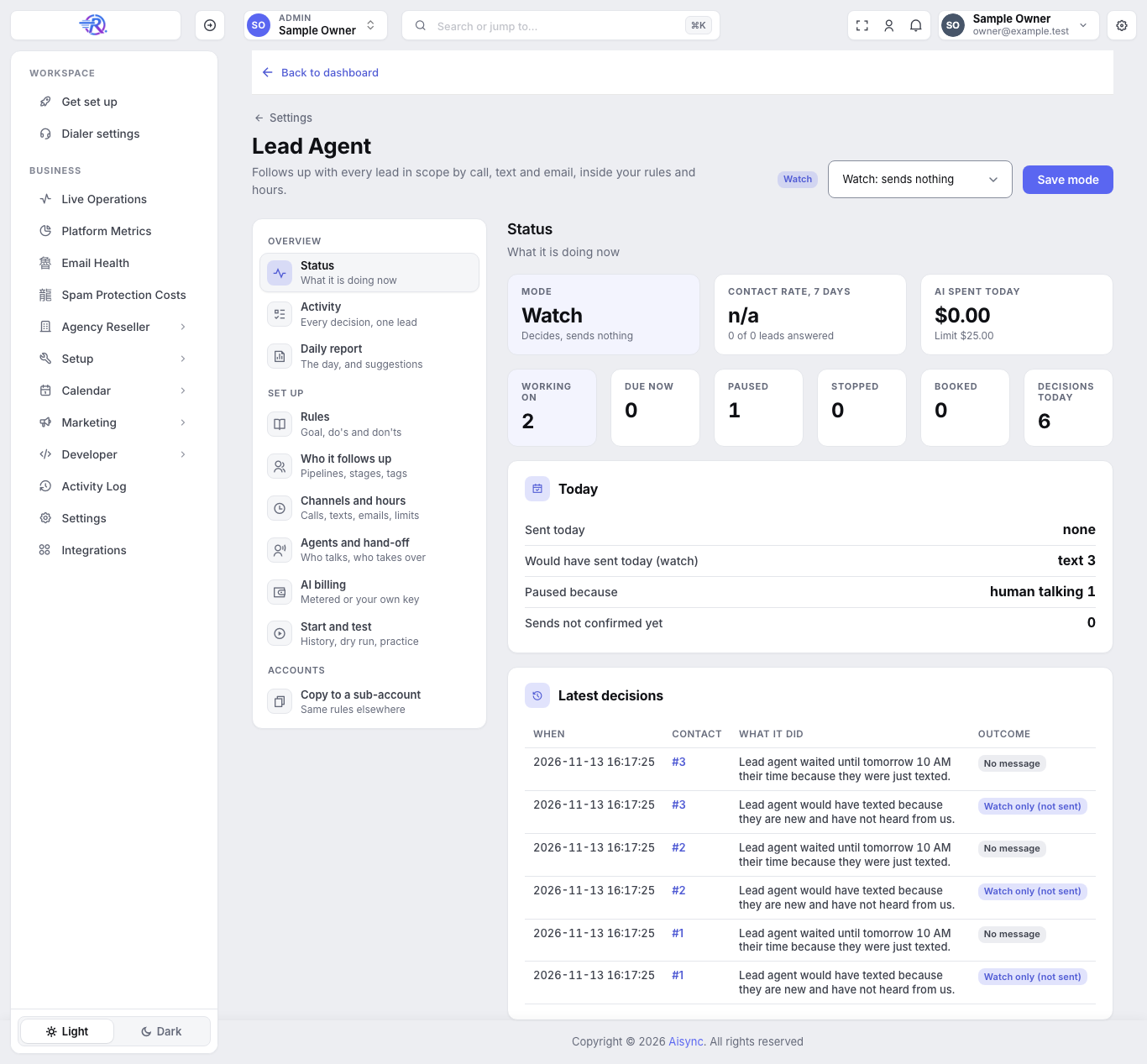
It starts Off for every account. It contacts nobody until you switch it on, and you can watch what it would do before it sends anything. See Set up the Lead Agent.
The Dashboard tab shows leads worked, replies, bookings, what the AI was billed and the latest decision, and Activity lists every touch. See Daily report and decisions.
Everyone on your team can open Settings → Lead Agent and see how it's doing. Only the account owner and admins can change it; everyone else sees the page read-only.
What it does for every lead#
- It reads everything. Texts, emails, AI calls and what the lead said on them, your team's notes, the lead's AI Memory profile, and any research it did on them.
- It checks the hard rules. Opt-outs, Do Not Disturb, calling hours, limits and more (listed below). These are checked in code, before the AI is even asked.
- It picks one step. Call, text, email, wait, hand off to your team, or stop.
- It does it through your own voice agent, texting line and email sender.
- It plans the next touch and writes one plain sentence on the contact's timeline, for example "Lead agent waited until Thu 9:00 AM their time because they asked to talk after work."
It wakes up early when something happens: a reply, a call ending, an appointment change, or a tag or Do Not Disturb change. Three quick texts in a row make one decision, a minute after the last one, so it never talks over the lead.
Which leads it works#
You choose the scope: everyone, or only some pipelines, stages, tags or lead sources. Deleted contacts and anyone on Do Not Disturb for everything are always left out.
- Old leads join when you add them once (this is called seeding, and it starts with a dry run).
- New leads join on their own: new contacts, lead form leads and contacts that arrive from GoHighLevel, as long as they're in scope.
How it decides#
Your rules, in plain words. You give it a goal (for example "book a call with an acquisitions manager"), a list of do's and a list of don'ts. You can give different wording or channels per lead source or campaign, for example Facebook sellers get texts only.
Timing it learns from the lead:
| Situation | What it does |
|---|---|
| The lead named a time ("call me at 4", "Thursday at 2") | Calls at exactly that time in their time zone, if calling is allowed then |
| A call they agreed to didn't connect | Texts them two real open times |
| No answer at a certain hour | Tries a different hour next time |
| It's after hours | Texts "is now OK, or tomorrow morning?" and calls now if they say yes |
| They asked to hear back later ("after the holidays", "in 30 days") | Checks in on that day, up to a year out |
| The voice agent already promised a callback | Waits until after it, so the lead never gets two calls |
| A new lead (first 7 days) | Looks at them at least once a day |
| A lead gone quiet 6 to 12 months | Looks at them at least every 3 days |
What it never does#
These are hard rules. No setting, assistant or prompt can turn them off.
| Rule | What happens |
|---|---|
| STOP or "remove me" on any channel | Every channel stops for good. It's recorded as Do Not Disturb in RizzDial and in GoHighLevel. |
| "Don't call me" or "no more emails" | Only that channel stops, and it's recorded on that channel in GoHighLevel too. |
| Do Not Disturb in GoHighLevel | Read for every lead linked to GoHighLevel, per channel (calls, texts, email). If GoHighLevel can't be read for a linked lead, nothing goes out on any channel. |
| Calling hours | Never contacts a lead outside 8 AM to 9 PM in their own time (8 PM in Florida). You can narrow these hours, never widen them. |
| Your business hours | Outside them it only calls if the lead asked for a call. Default: Mon to Fri 9 to 7, Sat 10 to 4, Sun closed. No outreach on Thanksgiving or Christmas. |
| Limits | Per lead: 2 calls a day and 6 a week, 2 texts a day and 6 a week, 1 email a day and 3 a week, 3 touches a day in total. Per account: 300 a day. You can change these. Replying to a lead within an hour of their message doesn't count. |
| One AI per lead | While your AI text agent is talking with a lead, the Lead Agent leaves that lead alone for 48 hours after the text agent's last message. |
| A person is talking | When someone on your team calls, texts or emails a lead, the Lead Agent pauses that lead for 48 hours, then picks up again on its own. |
| Never claims to be human | It always says it's an AI assistant for your business, and never names the software behind it. |
| The off tag | A contact tagged ai-off (in RizzDial or GoHighLevel) is left alone. Remove the tag and it picks up again. |
When it hands off to your team#
It hands a lead to a person when the lead:
- asks for a person;
- is truly angry or abusive ("lose my number" counts; "is this a scam?" just gets an honest answer);
- threatens legal action (that lead is never contacted again);
- already booked and writes again (your rep answers, not the AI).
A hand-off creates a task in GoHighLevel, and can also text your hand-off person, post to your Slack and show an in-app alert. The lead is then paused until someone on your team resumes them.
Memory and research#
- Memory. With AI Memory on, every call and text starts from what's known about the lead: who they are, what they want, their concerns and the agreed next step. Older calls are summed up in one line so the long-term story isn't lost.
- Research (optional). Before its first touch, the agent can research each lead once: their company and email domain, your notes, what they wrote, and any address or property fields. The first touch waits up to 10 minutes for it. It's off by default because it uses AI on every new lead.
Booking and moving appointments#
- By text, it offers two real open times from your calendar. It books only when the lead's newest reply picks one of those times.
- It confirms only real bookings. A booking counts only once it's read back from GoHighLevel: the right contact, the right time, not cancelled. If it can't confirm it, it sends nothing that claims a booking and hands the lead to a person.
- It records how they booked. The contact gets the tag
ai-booked-call,ai-booked-textorai-booked-email, and you can map a custom field for it too. - One confirmation. It sends one short confirmation text only if you don't already have a booking workflow that confirms.
- Moving an appointment. When a booked lead asks to move it, the agent offers two times and moves the same GoHighLevel appointment (same length, never cancel and rebook), then reads it back. A move it can't verify goes to a person.
Bookings on Google or Calendly calendars always go to a person to confirm, because those calendars don't return a booking ID the agent can check.
Contact rate#
Contact rate is the number the Lead Agent is judged on:
Contact rate = leads who answered ÷ leads the agent reached out to.
A lead counts as answered when, after the agent's first touch, they texted back, emailed back, called in, or had a real conversation on an AI call. It's counted on live sends only, so it reads n/a in Watch mode. See Daily report and decisions.
Watch first, then live#
| Mode | What it does |
|---|---|
| Off | Nothing at all. |
| Watch (in the menu: Watch: sends nothing) | Decides for every lead and writes down what it would do, including the exact words. Contacts nobody. |
| Live | Really calls, texts and emails. Every rule is checked again right before each send. |
Watch mode uses AI too, so it's billed the same as Live. See AI billing.
Not the same as the workflow "Lead agent" step. The workflow builder has an older test step called Lead agent. It only logs, never sends, and its settings don't change the always-on Lead Agent described here.