Test in four stages. Each one is safer than the next one, so don't skip ahead.
| Stage | Who it contacts | How long |
|---|---|---|
| 1. Fictional leads | Nobody | About 30 minutes |
| 2. Watch mode | Nobody | At least 1 full day |
| 3. Your own phone | Only you | 1 to 2 days |
| 4. A small batch | 25 to 50 real leads | 3 days, then widen |
Do the setup guide first, up to Step 10 (rules written, GoHighLevel history pulled).
Stage 1: Test on fictional leads#
Ask your AI assistant:
Run the Lead Agent simulation.It runs your exact rules against fictional sellers (cold, hot, already got an offer, angry, says STOP, says "call me at 2") on fast-forward and scores each one.
- It contacts nobody and never touches your real contacts. Everything is labeled SIMULATION.
- It uses real AI, so it's billed, and your assistant asks first. At most 2 runs an hour.
You can also run it from the page: Start and test → Practice with real AI (or Practice (free) to check the plumbing at no cost).
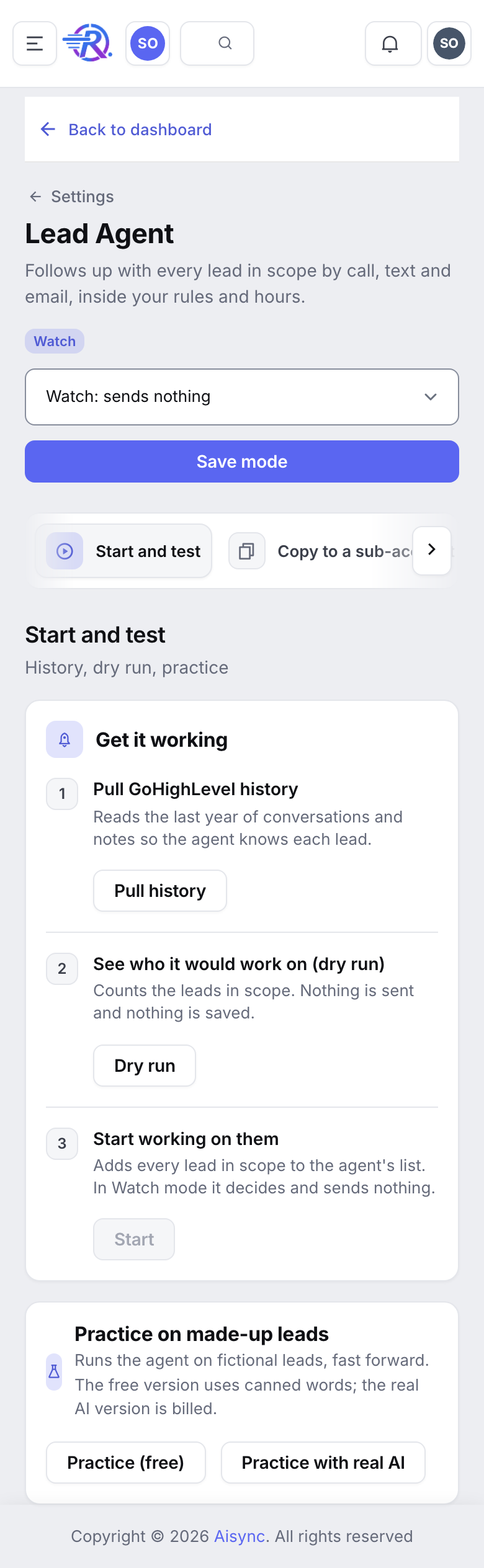
Then ask "Show me the simulation results." For each failed check, fix the rule it broke and run it again.
Pass: no scenario breaks a don't, and STOP, anger and "call me at 2" are handled right.
Stage 2: Watch mode for a day#
Watch mode decides for your real leads and writes down exactly what it would send. It contacts nobody.
Set a small scope
In Settings → Lead Agent → Who it follows up, pick one tag or one stage and click Save who it follows up. Or ask your assistant "Only work leads tagged ai-test."
Switch to Watch
In the mode menu at the top right of Settings → Lead Agent, choose Watch: sends nothing and click Save mode. Watch is billed AI, the same as Live.
Add your existing leads
In Start and test, click Dry run, read the counts, then click Start. Or ask "Add my leads to the Lead Agent. Dry run first." New leads join on their own.
Wait a full day, then review
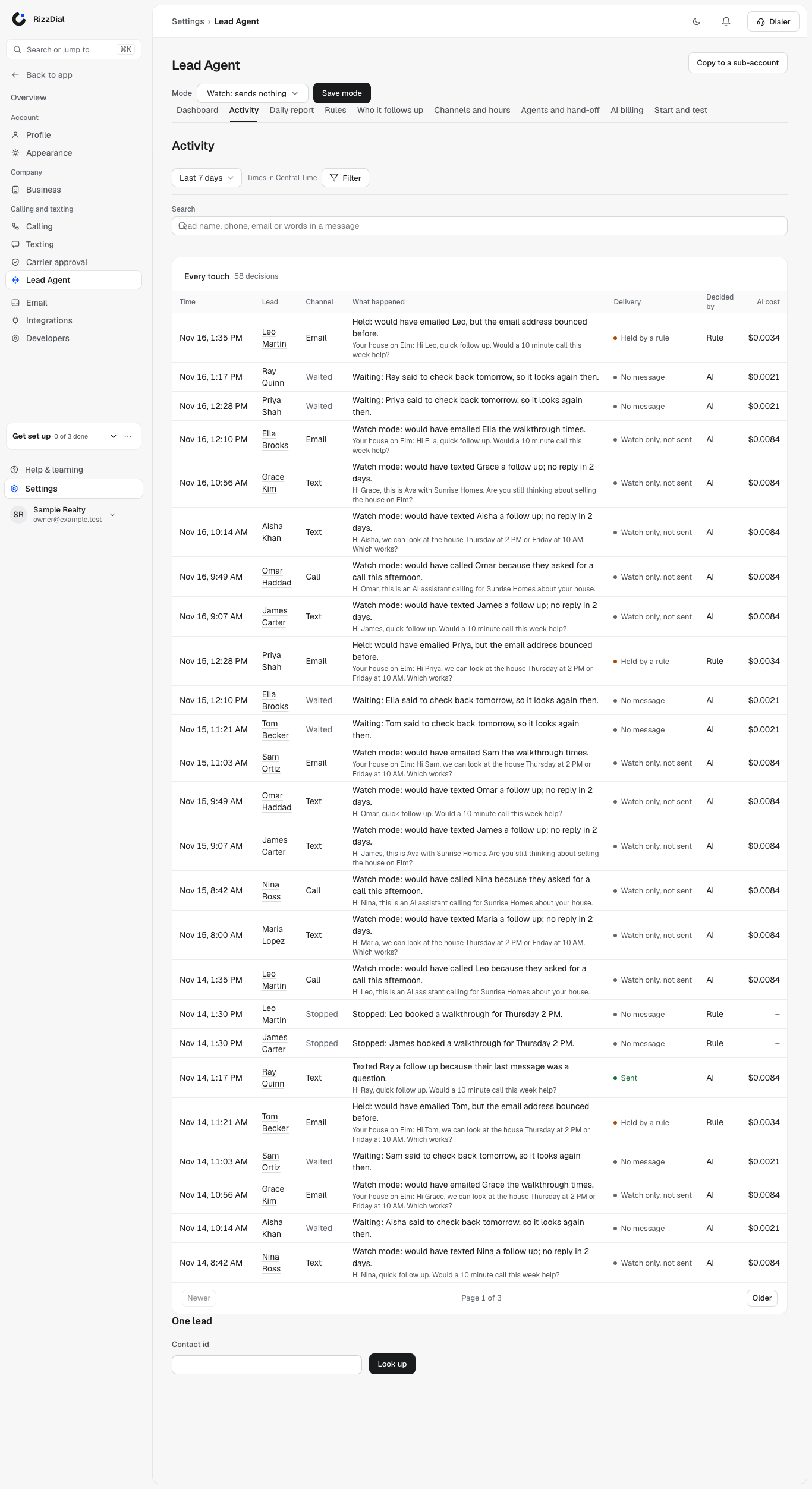
Read the decisions in Settings → Lead Agent → Activity (set From and To to yesterday), on a contact's timeline under Changes, or ask "Show me yesterday's decisions."
Check every decision for:
- No broken don'ts. No offer numbers, no promises, nothing you ruled out.
- Right time. Inside your calling hours, no double touches.
- Right channel. Texts for SMS-only lists, calls for hot leads.
- Leads your team is talking to are left alone. They should show as paused, not contacted.
- Hand-offs make sense. Would your team want each one?
Split the review: one person reads 20 decisions a day for rule breaks, your reps check hand-offs and their own leads.
Pass: a full day with nothing that breaks a rule.
Stage 3: Test on your own phone#
This is the only stage where the agent really sends, and it sends only to you.
Real sending is switched on for your account by RizzDial. Before this stage, message RizzDial support and say you're ready for the phone test. Until it's on, Live works like Watch: the page says Live is saved but sending is off for this account: ask support, decisions show Watch only (not sent) and nothing is sent.
Set up your test lead#
Create a test contact
Use your own mobile number and your own email. Give it a made-up seller name and a property address. Add the tag ai-test. If you use GoHighLevel, create it there so it syncs.
Narrow the scope to only that tag
In Who it follows up, set Tags to ai-test only, untick Every lead in this account, and click Save who it follows up. Or ask your assistant "Only work leads tagged ai-test" and check it says nobody else is in scope.
Switch to Live
In the mode menu, choose Live and click Save mode. Do this inside your business hours so it can call.
Run these tests#
Do them in this order. STOP is always last, because it stops your number for good on this account.
| # | Test | What you do | What should happen |
|---|---|---|---|
| 1 | First touch | Nothing. Just wait. | A new lead in scope gets its first call or text within minutes, inside your hours. |
| 2 | Call | Answer. Ask "Is this a real person?" and "What will you offer me?" | It says it's an AI assistant for your business. It doesn't give a number. It sounds natural. |
| 3 | Exact callback | On the call or by text, say "Call me back at 3:15." | It calls at 3:15 your time (if that's inside calling hours). |
| 4 | Text | Reply to its text with a question. | It answers within a few minutes, short and on topic. Three quick texts in a row get one answer, not three. |
| 5 | Reply to its email. | It reads your reply and answers on the best channel. (Needs a verified sending domain.) | |
| 6 | Book | Text "Can we set up a time to talk about my house?" | It offers two real open times. Pick one. It books on your calendar, tags the contact ai-booked-text, and you get your booking alert. |
| 7 | Reschedule | Text "Can we move that to tomorrow?" | It offers two new times and moves the same appointment. Check your calendar: one appointment, new time, nothing cancelled. |
| 8 | Ask for a person | Text "I want to talk to a real person." | A task appears in GoHighLevel, your hand-off person gets an alert, and the lead is paused. |
| 9 | Your team replies | Resume the lead ("Resume the Lead Agent for [test name]"), then text or call it yourself from your CRM. | The agent leaves the lead alone for 48 hours. |
| 10 | Off tag | Add ai-off to the contact, wait, then remove it. | Nothing goes out while it's on. It picks up again after you remove it. |
| 11 | STOP | Text STOP. | Every channel stops for good. The contact is set to Do Not Disturb in RizzDial and GoHighLevel. Nothing else ever goes out to that number. |
Per-lead limits still apply to your test lead: 2 calls a day, 2 texts a day and 3 touches a day in total. If it stops reaching out, it may simply be waiting for tomorrow. Ask "What is the Lead Agent doing with [test name]?" to see why and when it plans the next touch.
Want to keep testing after STOP? Use a second test contact with a different phone (a teammate's) and the same ai-test tag.
Pass: all 11 tests behave as listed. If any don't, switch the mode back to Watch, tell RizzDial support which test failed, and try again after the fix.
Stage 4: Live on a small batch#
Pick 25 to 50 real leads
Tag them, or pick one small stage. Set the scope to just that group.
Leave it Live for 3 days
Each morning, read the daily report (in Slack or ask "Show me yesterday's Lead Agent report") and 20 of the day's decisions.
Check the numbers
Ask "How is the Lead Agent doing?" Look at contact rate (leads who answered out of leads it reached), bookings, hand-offs and anything blocked.
Widen in steps
If nothing breaks a rule, widen the scope: a bigger tag, then a full stage, then everyone. Your assistant shows each change and asks first, because the agent is Live.
To stop at any time: Settings → Lead Agent, mode menu → Off → Save mode. Every send checks the mode again right before it goes out.