Your own calling account on the AI Sync Network starts with a short application. A person at the carrier reviews every application by hand, usually within a few hours, and only approves complete, clean ones. A few things get an application declined automatically, so AI Sync checks them for you before anything is sent.
You see the Carrier approval checklist at the bottom of the application (Settings, then Carrier approval). It updates as you type. Submit application stays off until every item is green.
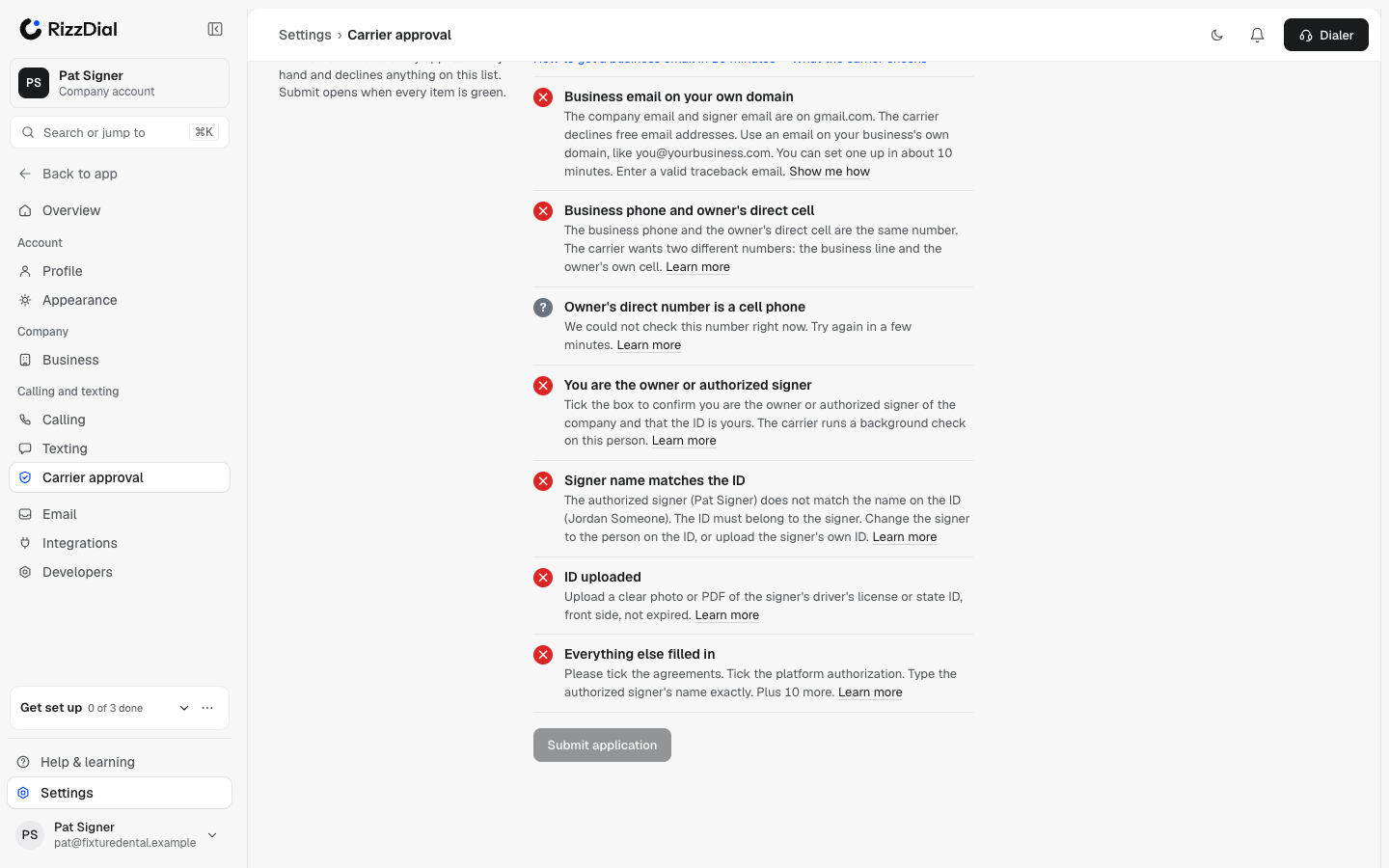
Calling keeps working on your starter number the whole time. The application only moves you to your own account.
What each color means#
| Color | Meaning |
|---|---|
| Green check | Done. |
| Red cross | The carrier would decline this. Fix it before you submit. |
| Yellow ! | A warning. It does not block you. |
| Grey ? | We could not check it right now (for example, the phone check is busy). Wait a minute and it re-checks. It never counts as green. |
The checklist#
Business email on your own domain#
The company email, signer email and traceback email must all be on your business's own domain, like you@yourbusiness.com. Free addresses (Gmail, Yahoo, Hotmail, Outlook.com, AOL, iCloud, and internet-provider addresses like Comcast or AT&T) are declined.
Fix: Get a business email. It takes about 10 minutes.
Email matches your website (warning only)#
If you entered a website and your company email is on a different domain, you see a yellow warning. Reviewers prefer them to match. It does not block you.
Business phone and owner's direct cell#
The carrier wants two different numbers:
- Business phone: the company's main line.
- Owner's direct cell phone: the personal cell of the owner or authorized signer.
Fix: enter both as 10-digit US numbers, and make sure they are not the same number.
Owner's direct number is a cell phone#
The owner's direct number must be a real cell phone line on a mobile carrier like T-Mobile, AT&T or Verizon. We check the number automatically.
These are declined:
- Internet (VoIP) numbers: Google Voice, TextNow, numbers from a phone app, or numbers rented from a calling platform.
- Landlines and toll-free numbers.
Fix: use the owner's own cell phone number.
You are the owner or authorized signer#
The person filling in the application must be the owner, managing member, or another person allowed to sign for the company. The carrier runs a background check on this person.
Fix: tick I am the owner or authorized signer of this company, and the ID uploaded above is mine. If that is not you, ask the owner to fill in the application.
Signer name matches the ID#
Type the name exactly as printed on the ID. It must match the Authorized signer name. A middle name or initial on one of them is fine; a different person is not.
Fix: change the signer to the person on the ID, or upload the signer's own ID.
ID uploaded#
Upload the signer's driver's license or state ID: front side, clear, not expired. PDF or image, up to 4 MB.
Everything else filled in#
The rest of the form: legal name, EIN, address, state and year of incorporation, the campaign description, contacts, the yes/no questions, proof of incorporation, the agreements and your typed signature. The checklist names exactly what is missing.
Not required for calling#
A website. Calling-only accounts do not need one. A website is only required when you register your business for texting.
Using the AI assistant#
Ask your assistant "Is my carrier application ready?" It shows the same checklist and tells you what to fix. Signing and submitting always happen on the application page.