US carriers only deliver business texts from registered numbers. Carriers call this 10DLC. In AI Sync it is simply texting registration. It costs nothing extra, and once you submit it runs on its own.
Calling never waits on this. You can call from your numbers the whole time. Need to text before you are approved? Use Text today with Beam.
Start#
On Get dialing, go to Set up texting and click Start registration. The Texting registration page opens.

You fill in two things, then AI Sync checks them before anything goes to the carriers:
- Your business. Legal name, EIN, address, website and contact come from your Business profile. If the page says your profile is not finished, click Edit business profile first.
- How you text. What you text about, how people agree to get texts, the exact consent words they see, links to your opt-in page, privacy policy and terms, and 2 to 5 sample messages.
Click Save and check. If something would get rejected, the check tells you what to fix. When it passes, click Submit registration. Nothing is sent to the carriers until you do.
The stages and how long they take#
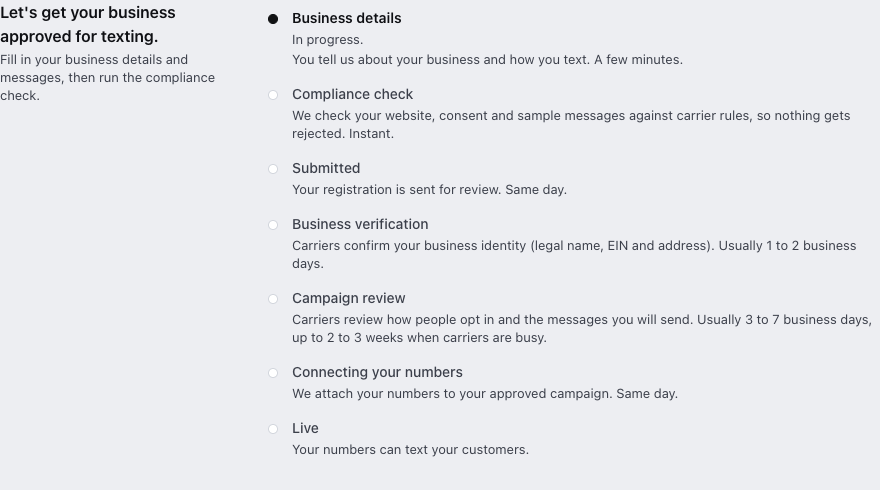
| Stage | What happens | Usually takes |
|---|---|---|
| Business details | You tell us about your business and how you text. | A few minutes |
| Compliance check | We check your website, consent and sample messages against carrier rules. | Instant |
| Submitted | Your registration is sent for review. | Same day |
| Business verification | Carriers confirm your legal name, EIN and address. | 1 to 2 business days |
| Campaign review | Carriers review how people opt in and the messages you send. | 3 to 7 business days, and it can take 2 to 3 weeks when carriers are busy |
| Connecting your numbers | We attach your numbers to your approved registration. | Same day |
| Live | Your numbers can text your customers. |
Plan on about 1 to 2 weeks in total, longer when carriers are busy. You don't need to do anything while it is in review. Get dialing shows In review and updates on its own.
What carriers check#
Most rejections come from three places. Get these right and you will usually pass the first time.
1. Your website#
- It loads on your own domain (not a Facebook page or a link-in-bio page) and uses https.
- It shows your business name, the same as on your registration.
- It has a privacy policy that says you don't share or sell phone numbers for marketing.
- It has terms that describe your texts: what they are about, how often, "Msg & data rates may apply", and how to reply STOP and HELP.
2. Consent (opt-in)#
- People must agree before you text them. Bought, rented or shared lists are never allowed.
- On a web form, the texting checkbox is unchecked by default and optional.
- The consent words name your business and say what they will get, how often, that rates may apply, and how to opt out.
- If people agree another way (on a call, on paper, by texting a keyword), you need a public link or screenshot that proves it.
3. Sample messages#
- 2 to 5 real examples of what you will send.
- Each one names your business.
- At least one says how to opt out, for example "Reply STOP to opt out".
- No link shorteners such as bit.ly.
- Nothing carriers refuse, such as lead-list resale, debt or credit repair, cannabis, firearms, gambling, adult content or multi-level marketing. Alcohol, tobacco and vape businesses need an age check at sign-up.
Common rejection reasons and how to fix them#
| Rejection reason | How to fix it |
|---|---|
| Business name or EIN doesn't match tax records | Use your legal name exactly as it appears on your IRS letter. Update your Business profile. |
| Website missing, broken or not your own domain | Publish a simple site on your domain with your business name, privacy policy and terms. |
| Privacy policy doesn't cover phone numbers | Add a line such as "We do not share or sell your phone number or texting consent with third parties for marketing." |
| Opt-in can't be verified | Add the link to the page where people sign up, or a screenshot of your form or script. |
| Checkbox is pre-checked or required | Make it unchecked and optional on your form. |
| Sample messages too vague or missing your name | Rewrite them as real texts you will send, with your business name and "Reply STOP to opt out". |
| Messages don't match what you described | Make "What your texts are for" match your samples. If you send offers and reminders, say both. |
When a carrier asks for a change#
Get dialing shows Needs a fix with a short reason, and the registration page explains it in plain words.
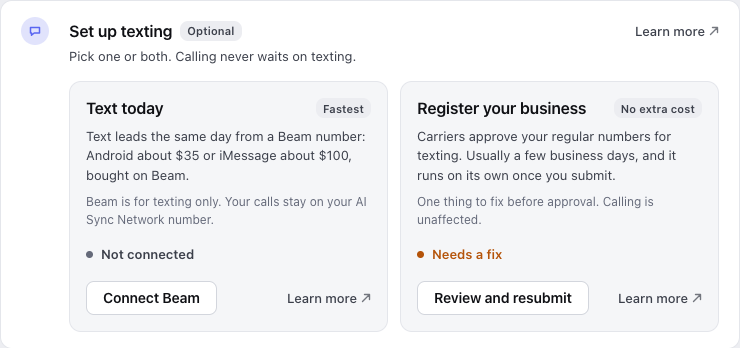
Open the registration
Click Review and resubmit on Get dialing.
Fix what it says
Change your answers, or fix your website if the problem is there.
Check and resubmit
Click Save and check, then submit again.
Replies we send for you#
When someone texts STOP, HELP or START, they get an automatic reply with your business name. You can see the exact wording at the bottom of the registration page.
Do it by chat#
Ask your AI assistant "Start my texting registration" or "Where is my texting registration?". See Carrier setup by chat and Register for texting by chat.