When a lead asks to hear back at a certain time, the Lead Agent puts a task on its own list and does it at that time. It works the time out in code, not by guessing, so the same words always give the same time.
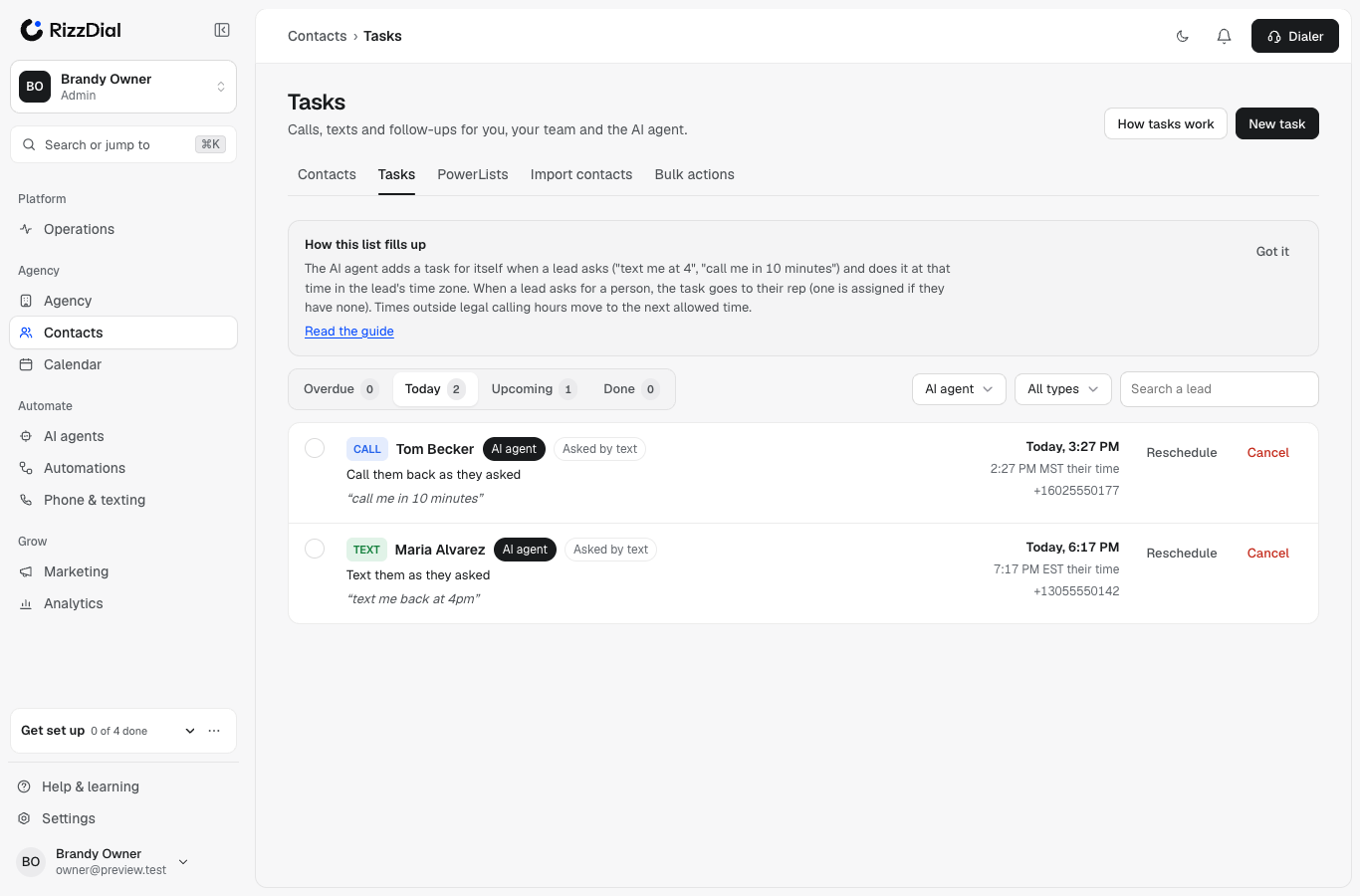
What happens, step by step#
- The lead writes something like "text me back at 4pm".
- The agent reads the time in the lead's own time zone, and whether they want a call, a text or an email.
- It replies once to confirm: "Sounds good, I'll text you right at 4 PM."
- It adds a task for itself, with the lead's exact words and anything it had to assume.
- At that minute it checks every rule again, then calls, texts or emails as they asked, and marks the task done. A call opens knowing they asked for it.
Examples with time zones#
| The lead | They write | The task |
|---|---|---|
| Miami (Eastern), at 3:50 PM | "text me in 10 minutes" | Text at 4:00 PM ET. A relative time counts from the moment they wrote. |
| Phoenix (Arizona time, no daylight saving) | "call me at 4" | Call at 4 PM MST. "4" with no AM or PM between 1 and 7 means PM, and the task says so. |
| Florida, in the evening | "call me at 10 tonight" | Moved to the next morning, because Florida allows calls until 8 PM. The lead is told the real time. |
| Anywhere, at 9 AM | "call me after lunch" | Call at 1 PM their time. The task notes: "after lunch" read as 1 PM their time. |
| New York | "call me at 4 pacific" | Call at 4 PM Pacific (7 PM Eastern). The task notes the zone they named. |
Every phrase type, with worked examples, is on Time phrases, with examples.
Changes the lead makes#
| The lead | What happens |
|---|---|
| "actually make it 5" | The same task moves to 5 PM. No second task. |
| "never mind", "nvm no need" | The task is cancelled, with their words as the reason. |
| "email me the details tomorrow" | An email task for tomorrow at 10 AM. |
| "text me the info now and call me tomorrow" | Two tasks: the text goes now, the call is set for tomorrow. |
| "call my husband at 843-555-0199" | A rep task, never an AI call or text. The note says the owner of that number has not agreed to be contacted, so a person must confirm consent first. |
| "don't call me, text is fine" | Calls are turned off for them, and a scheduled call becomes a text at the same time. |
| The lead writes again before the task is due | The agent answers them, and open tasks show a Lead already responded chip, so nobody calls about something already handled. |
Requests made on a call#
If a lead says "call me back in 20 minutes" or "call me Thursday at 2" on an AI call, it becomes a task too:
- If the voice agent booked the callback during the call, that callback shows on the AI agent's list and closes when it is placed.
- If the Lead Agent works this lead, it reads the call, schedules itself, and can text once to confirm the time.
- If neither did, a callback task goes to the lead's rep, so a promise made on a call is never lost.
One owner per callback. A workflow's AI call step skips a lead whose AI callback is due within the hour, so the lead never gets two calls at once.
The rules it always follows#
- Legal hours in the lead's zone. 8 AM to 9 PM, Florida 8 AM to 8 PM, or your narrower Lead Agent hours, plus each state's own rule for that number. Florida spans two time zones, so a 305 number is only called once it is 8 AM in both (9 AM Eastern). A time outside the rules moves to the nearest allowed time, and the lead is told the real time.
- Business hours don't block a time the lead asked for. If a lead asks for 7:30 PM and calls are legal then, the agent calls at 7:30 PM even if your office closes at 7.
- Your limits still apply to callbacks they asked for: calls and texts per day and week, touches per day, the daily send budget and the AI spending cap. If a limit is reached, it waits for the next allowed moment. A lead who wrote in the last hour is being answered, so limits don't block that reply.
- STOP cancels everyone's call and text tasks for that lead, the AI's and your reps', with the reason on each task.
- Do Not Disturb and wrong number cancel all open tasks for that lead.
- Do Not Call cancels the call tasks; email unsubscribe cancels the email tasks.
- A booking cancels the AI's open follow-ups, and adds a note to your reps' open tasks for that lead: The lead booked an appointment. Check before calling.
- A person takes over (the lead asks for a person, or is upset): the AI's own tasks for that lead are cancelled and the task goes to a rep.
- Done exactly once. Each task is claimed before anything is sent. A second look at the same moment sends nothing.
On time#
The agent checks for due tasks every minute. A task normally runs within 2 minutes of its time. If something delays it:
- Up to 30 minutes late: it runs normally.
- More than 30 minutes late: a call says briefly that we couldn't call right at their time. It never suggests they missed us.
- More than a day late: it becomes a short check-in text.
- More than a week late: it is dropped, and the lead is looked at fresh.
If the AI agent is turned off when its task is due, nothing is sent. The task closes with the reason, and the account owner is told, so it never goes out later by surprise.
Watch mode#
In watch mode the agent still adds its own tasks, so you can see what it plans. When the time comes, it closes the task as would have and sends nothing. It also assigns no rep and makes no rep task. Those happen only when the agent is live.
Move or cancel the agent's task#
Owners, admins and managers can open Contacts → Tasks, pick AI agent, and:
- Reschedule it: the agent acts at the new time.
- Cancel it: the agent won't call or text at that time.
- Give it to a person (bulk Reassign, or by chat): it becomes that rep's task and the agent won't also reach out.