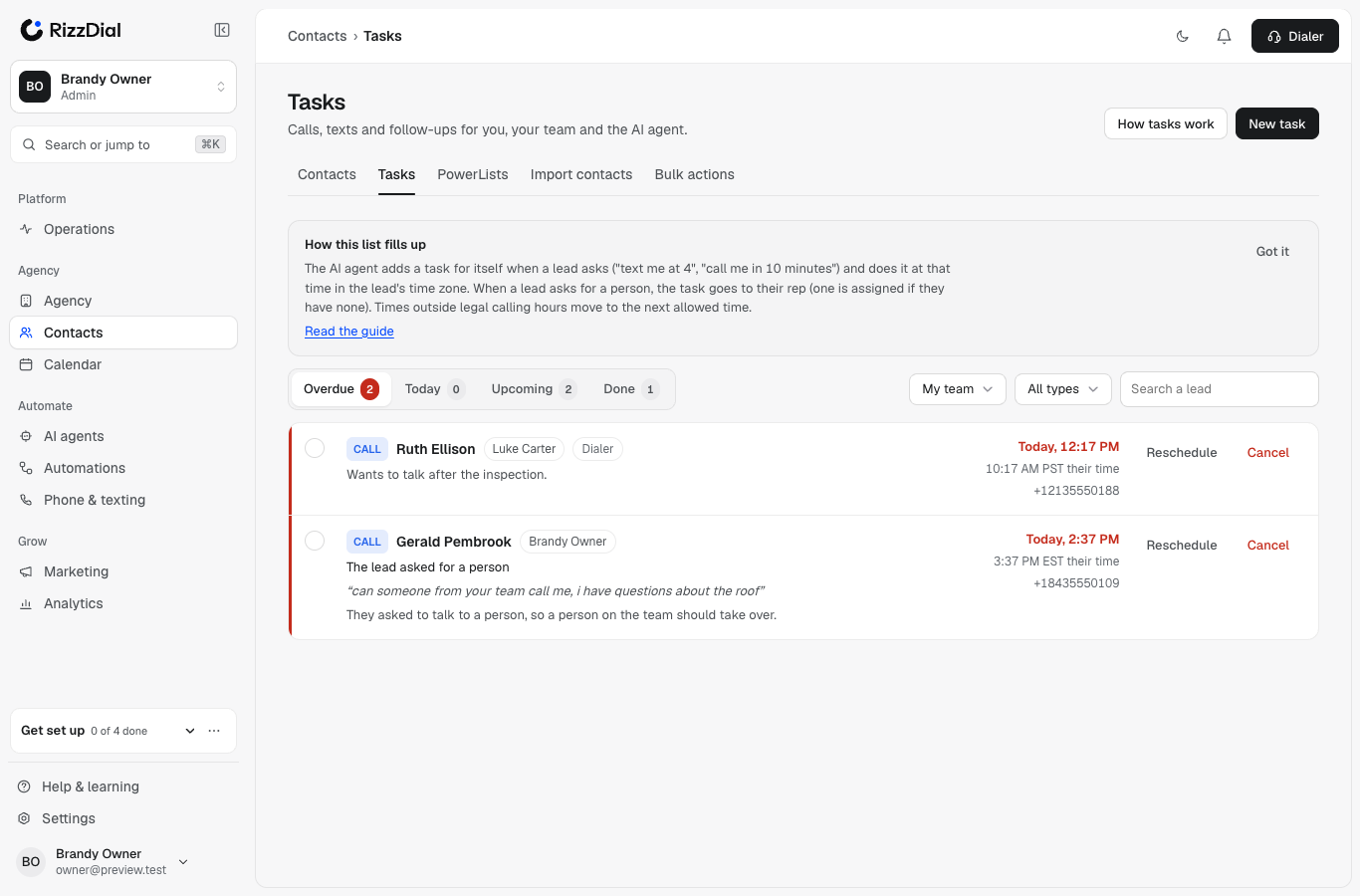
Tasks is one list of everything someone owes a lead: a call, a text, an email or a follow-up. It holds three kinds of tasks:
- Your tasks. Callbacks you promised in the dialer, tasks you add by hand, and tasks a workflow gives you.
- Your team's tasks. Managers see the reps they manage. Owners and admins see everyone.
- The AI agent's own tasks. When a lead writes "text me back at 4" or "call me in 10 minutes", the AI agent puts a task on its own list and does it at that time, in the lead's time zone.
Where to find it#
Open Contacts → Tasks. The same tasks also show:
- on each lead's page, in the Tasks block under the activity;
- in the dialer's Callbacks tab, with the same count badge reps already watch.
What fills the list#
| Where it comes from | Who owns the task | Example |
|---|---|---|
| A lead asks for a call or text at a time | The AI agent | "text me back at 4pm" |
| A lead asks for a person | The lead's rep (one is assigned if they have none) | "can someone from your team call me?" |
| A lead asks for a callback on an AI call and nothing booked it | The lead's rep | "I'm driving, call me back tomorrow at 3" |
| A rep sets Callback At on the disposition card | That rep | Call back after lunch |
| A workflow's Create Task step | The person you pick, or the lead's rep | "Send the offer summary" |
| You, or your AI assistant by chat | You choose | "Remind Luke to call Dana Friday at 10" |
Every time is the lead's time#
Each task stores the lead's time zone. The list shows the time in your zone and, when it's different, the lead's own clock next to it, for example Today, 2:37 PM and 3:37 PM EST their time.
The lead's zone comes from their state, then their phone's area code.
The rules that never bend#
- Legal hours. No call or text task is ever set outside legal hours where the lead is: 8 AM to 9 PM (Florida 8 PM), or your own narrower hours. A time outside them moves to the nearest allowed time, and the lead is told.
- STOP, Do Not Disturb, Do Not Call and wrong numbers cancel the open tasks for that channel right away, your reps' included. A booking cancels the AI agent's follow-ups and notes your reps' tasks.
- Checked again when it runs. Every task is checked against every rule at the moment it is done, not only when it was made.
- Done once. A task the AI agent did is never done a second time, even if two things wake it at once.
Next#
How the AI schedules itself
What it reads, the times it picks, and what it tells the lead.
Time phrases, with examples
Every way a lead can say when, and the time it becomes.
Use the Tasks page
Tabs, filters, reschedule, cancel, and the lead's Tasks block.
Who gets the task
How a rep is picked when a lead has none.
Rules and escalation
Task pool, overdue alerts, AI backup, morning summary.
Set it up by chat
Connect your AI assistant and manage tasks by typing.