Open Contacts → Tasks and click Settings. Everyone can read the rules. Only the account owner and admins can change them.
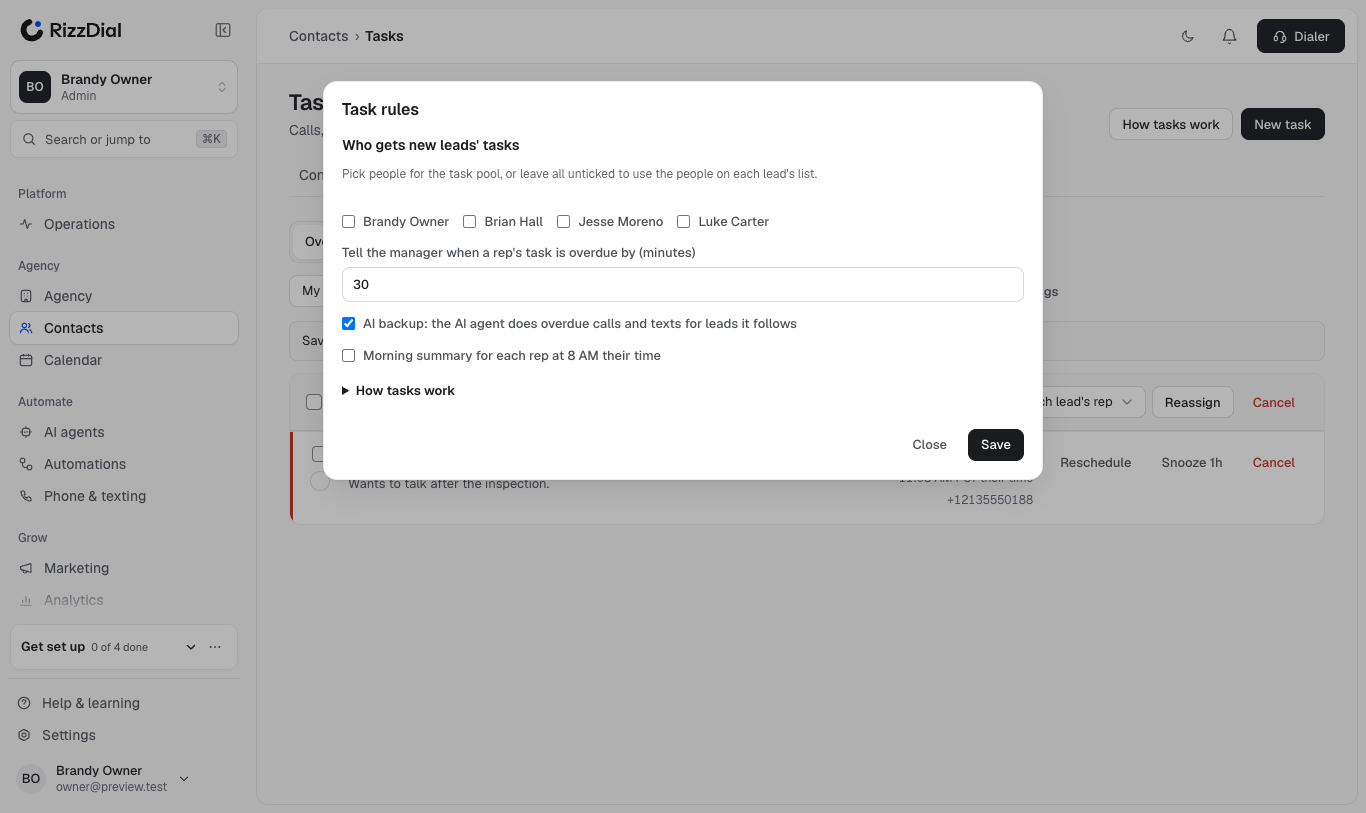
Who gets new leads' tasks (task pool)#
Tick the people who should take auto-assigned leads and tasks, for example your acquisitions team. Leave everyone unticked to use the people on each lead's list. See Who gets the task for the full rule.
Tell the manager when a task is overdue#
Set how many minutes a rep's task may be overdue before their manager is told. With no manager, the account owner is told. Each task is reported once, and it shows a Manager told chip. Leave it empty to turn this off.
AI backup#
When it's on, an overdue call or text task for a lead the AI agent follows is handed to the AI agent, which does it with every rule checked again. It only works when the AI agent is live.
Morning summary#
Each rep gets one in-app message at 8 AM their time with how many tasks are overdue and due today. Reps with nothing due get nothing.
When a rep leaves#
If a rep is deactivated or removed, their open tasks move to the next rep by the assignment rule, and the account owner is told. No task is left with nobody.
How tasks work (in the dialog)#
The How tasks work section of the dialog lists every rule in plain words, including your pool and escalation settings, exactly as your account applies them.